Review of Thecus N5200XXX 5-drive small office NAS
Such file servers appear more often than others in reviews on our website, precisely because such NASs are most in demand by small companies, in cases where the customer wants to purchase one server for storing data and assign maximum office space to it. functions. And if we are already accustomed to such functions as the `` print server '' and a video surveillance server (it seems that they were in NAS initially), then advanced functions such as web hosting or a database server are still rarely used in NAS, primarily due to the use of processors with low heat dissipation and relatively low performance.
The new Thecus Enterprise NAS promises a new level of performance and functionality in a 5-bay form factor. Declared compatibility with VMWare, Citrix, all modern Windows, MacOS and Linux.
We have already reviewed Thecus disk storages several times. The products of this company are interesting in that at a lower cost compared to competitors, the devices have the same basic functionality, which is quite enough for both end customers and integrators who choose Thecus solutions.
Key Features of Thecus N5200XXX
- Tower Enclosure
- Processor - Intel Atom D525 (1.8 GHz, 1 MB L2)
- Memory - 1 Gb DDR3 SODIMM
- Dual DOM Technology
- Networking - 2 Gigabit Ethernet (LAN/WAN) ports
- Possibility of IP address sharing
- 5 USB 2.0 ports
- Built-in 200W Power Supply
- Supports 5 SATA HDDs
- Support for RAID arrays of levels 0,1,5,6,10 and JBOD
- Support for multiple RAID arrays
- AES 256 bit encryption capability
- File protocols SMB/CIFS, HTTP/HTTPS, FTP, TFTP, NFS v3, AFP
- EXT3/EXT4/XFS/ZFS File Systems
- Snapshot support
- Acronis True Image (OEM) Package
- Web file manager
- ISO Mountable
- IP video surveillance with support for 5 cameras
- Mail server
- Dimensions 240x190x240 mm
Among the characteristics, we especially note the proprietary Dual DOM technology - dual flash memory for storing the operating system, the ability to mount an ISO image as a disk and IP sharing mode for network ports. But these functions are not as interesting when buying as the built-in video surveillance server for 5 IP cameras, which does not require additional licensing costs from you, as for example from Synology. Among file systems, one should keep in mind fast EXT3 and journaled EXT4, and more exotic XFS and ZFS ... I don't even know what they are for in NAS. Interestingly, Thecus N5200XXX officially supports RAID encryption and is certified for use in Russia. Well, for those who plan to use Thecus N5200XXX primarily for making and storing backups, the bundled disc with licensed Acronis True Image will be a nice bonus.
In general, except for Acronis and the NAS itself, there is nothing more interesting in the kit: a disc with the installer, instructions, a set of fasteners for drives, paper cards, cables, and that's all.

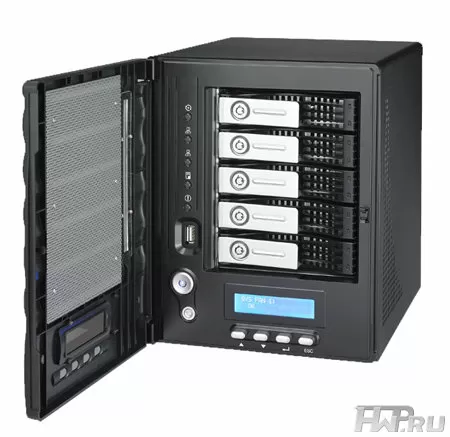
Externally, Thecus N5200XXX looks suspiciously familiar - a calm design in the shape of a turret, in which 5 HDD trays are horizontally located behind a closed door behind a closed door. There are various LED indicators on the left of the front panel, and a monochrome LCD screen with control buttons below the hard drives. The hard drive compartment is closed by a door, but each tray is individually locked with a key. When the door is closed, the indication on the disks is not visible, and it is difficult to understand what the signal LEDs are telling us.

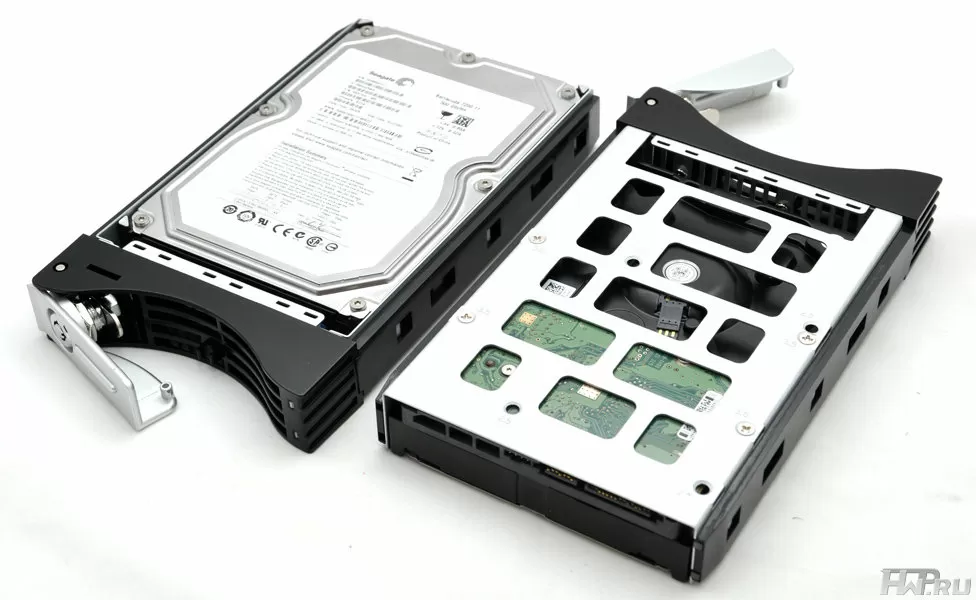
We praised the design of Thecus HDD trays in our reviews many times, and the N5200XXX model is no exception. The trays run smooth, the locks work as reliably as the old Colt.
The body itself is made of thick steel, therefore it is very rigid, which excludes vibration and the slightest bounce during operation. Thecus does not spare steel for its chassis, which is doubly unusual today.
The Thecus N5200XXX front panel has an LCD screen and multiple LED indicators that duplicate network activity, hard drives and general system health. Please note that the LCD backlight is always on, which once again confirms that this product is for the office, not for the home bedroom.

Server-grade built-in power supply Enhance electronics has a power of 200 W. This is more than enough to power all Thecus N5200XXX electronics and any five hard drives, with a large margin. The power supply is 80 Plus certified, and at the end of the warranty, you can find a worthy replacement for this power supply in the event of a breakdown.

Interestingly, the entire bay with 5 hard drives is cooled by a single fan with automatic speed control. The fan can be easily changed without completely disassembling the case. But we'll take a look at the Thecus N5200XXX server and take a look at the motherboard.

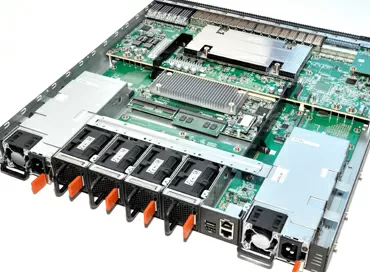
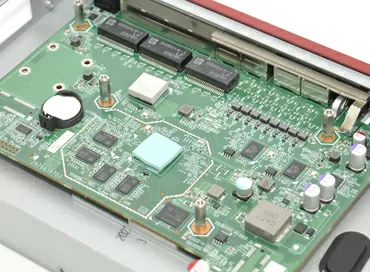
The motherboard is unusual, it was made specifically for Thecus NAS, but apparently for more powerful ones, since 4 SATA 300 ports remain unused on the board. But there is only one memory slot - SODIMM, and it is occupied by a memory module.
There is no VGA port for console connection on the board, but RS232 is a strange choice, but this is tradition for Thecus. Although, to use Thecus N5200XXX server as a security monitor, this would be just a necessary element. The fact that this board is used in other Thecus servers is confirmed by the presence of an unused PCI Express 1x port.
A simple cooler is used to cool the processor, although a powerful cooling system is not required for Intel Atom. So if the fan stops, the system will most likely survive. By the way, an interesting feature of the server cooling system is that Thecus N5200XXX fans always work at the same speed, and their speed control and, accordingly, the noise level, does not work, or is not provided at all. Against the background of the general obsession with environmental friendliness and energy efficiency, this is at least strange.
Interface
In our reviews of Thecus products, we have repeatedly talked about the functionality of the WEB-interface of these NAS-es.
Basically, the interface of Thecus N5200XXX looks very modern, it uses AJAX and Flash technologies, and for more convenience it uses full-text search by functions. True, the web interface lacks information content. You can easily find out the temperature of the processor and hard drives, but parameters such as the extended SMART status of hard drives are not displayed, and the web file manager will only come in handy to see if your files are in place.
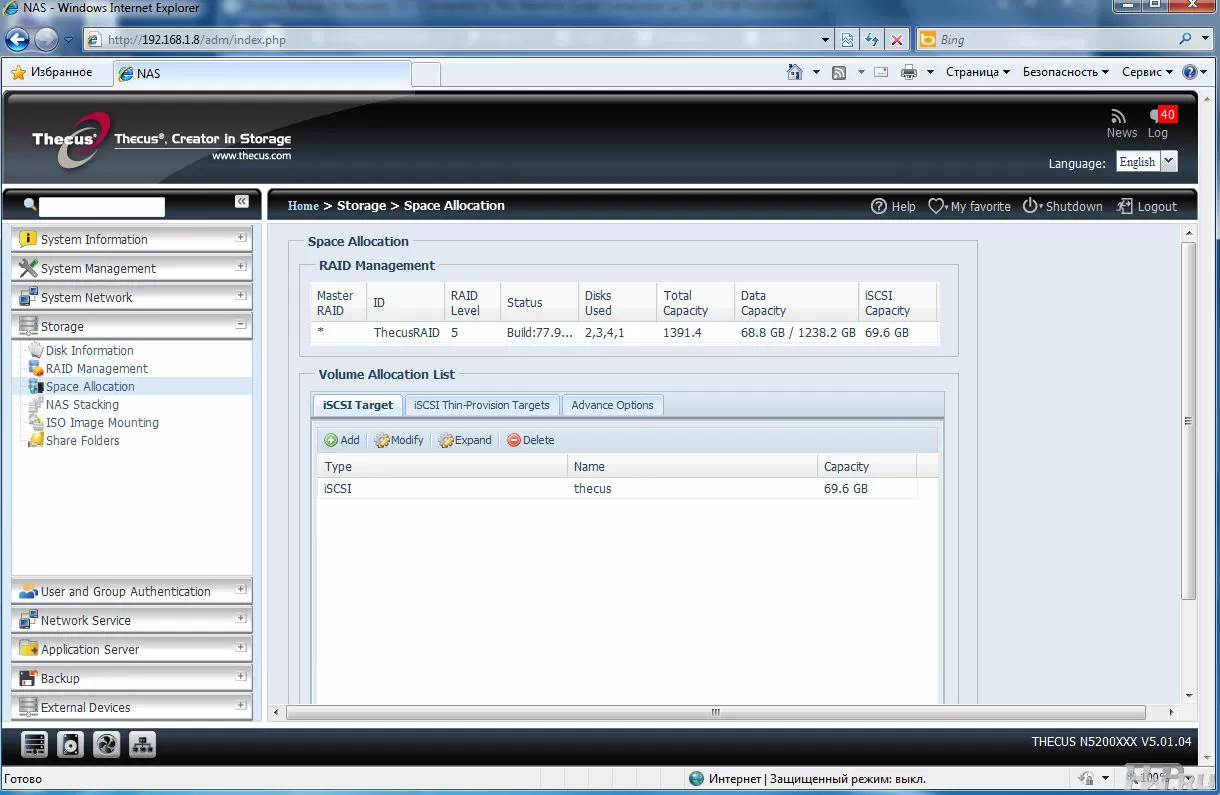
The Thecus N5200XXX is very unique in control. For example, you can create two or more RAID arrays, but you need to understand in advance how much space you will leave for iSCSI? After all, iSCSI is created by a partition in the unallocated area of the volume and subsequently resizing for iSCSI purposes will be impossible without deleting the array. But it also supports iSCSI Thin Provision and the ability to modify, delete and extend every iSCSI target, basically everything that is required from an iSCSI file server today.
Using additional modules, you can install MySQL database server, mail server and some other functions on the NAS.
Network link aggregation is supported for fault tolerance, and with RSYNC you can synchronize folders from NAS to another RSYNC server. By default, Thecus N5200XXX can make backups only via RSYNC and only from itself to another RSYNC server. FTP, TFTP is not supported, although FTP and TFTP servers are present. We would like to see the possibility of internal backup of folders, like in QNAP, support for NAS management via RSYNC, like in Netgear, and backup using FTP, like all of the above.
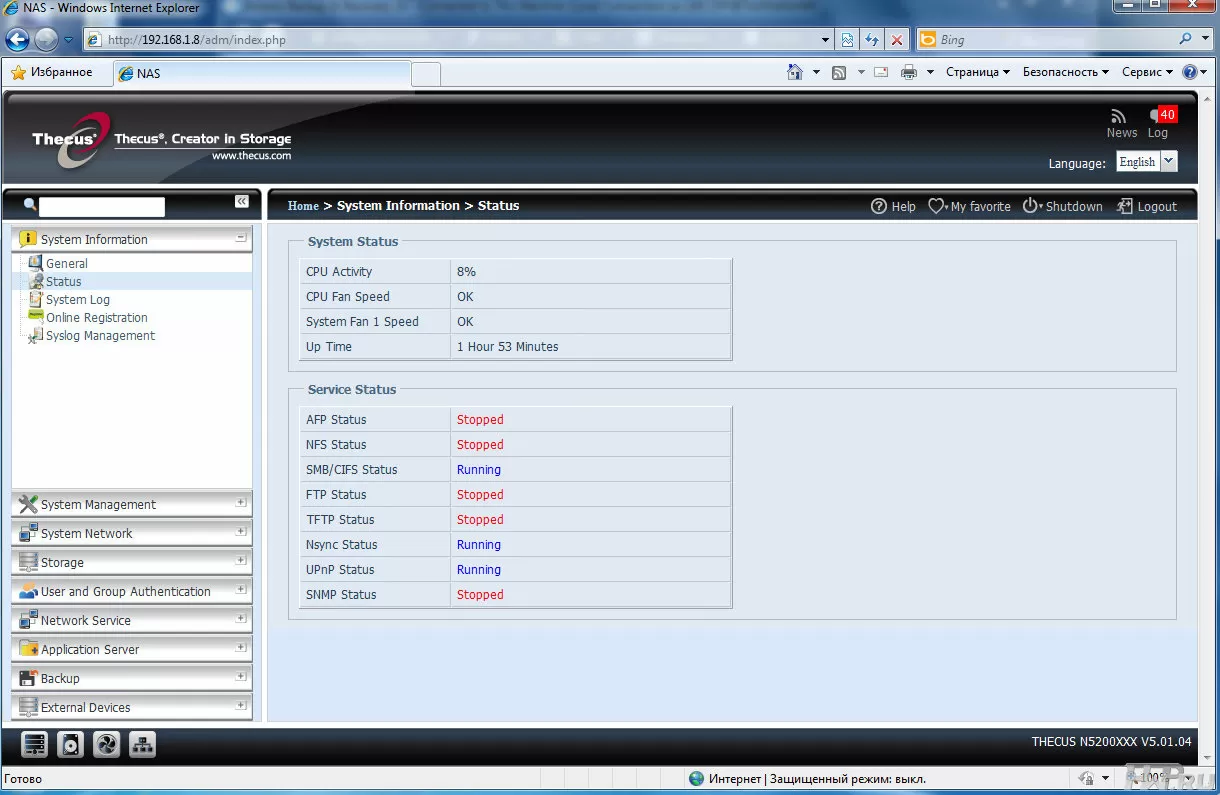
Basically, if you use Windows machines and Linux servers in your enterprise, then you can easily get by with the built-in tools for creating backups, and considering that the Thecus N5200XXX comes with licensed Acronis True Image, then there should be no problems with the backup. In matters of setting up users, groups and access rights, everything is extremely clear and convenient - there will be no difficulties.
There is a built-in iTunes server for organizing corporate multimedia library.
If we wanted to count the software "surpluses" that the manufacturer awarded his product, we would stumble even at the number "once". Absolutely nothing superfluous, but at the same time everything that may be needed in business is already integrated into this server. If you want to download torrents at work, use a NAS for video surveillance, set up a multimedia server, website or mail server on it - please, this is done with a few clicks using additional modules.
Testing
So let's move on to testing. We installed four 500 GB Seagate ST3500320AS hard drives in Thecus N5200XXX. We created a RAID 5 array with the EXT4 file system on them, on which we will test both Samba and iSCSI connections. NAS manufacturers today are claiming record speeds by testing their products with one hard drive or RAID 0. In both cases, speeds will be higher than RAID 5, but since we are talking about a business model for which data storage reliability is key. value, we will use this particular array.
A machine with the following configuration was used as a client:
- Intel Xeon 3220
- 4 Gb RAM
- Asus P5B Deluxe
- Hitachi HDS721010CLA332 1Tb HDD 7200 rpm
- Windows 7 Ultimate x64
- Windows XP x86
- Special folder for testing in real applications: 592 directories/11 520 files/54.2 GB
The client computer was connected to the file server with one network port, directly, without using switches. The purpose of our testing is to find out what a regular computer, even a powerful one, will get from connecting to the Thecus N5200XXX file server and compare the speed data with the speed of a local hard drive, even if not the most modern one. We doubt that 2 or more network channels will be laid on the way from the computer to the NAS, so we do not use Port Trunking technology.
Let's start with synthetic benchmarks, and start as usual with Atto Disk Benchmark.
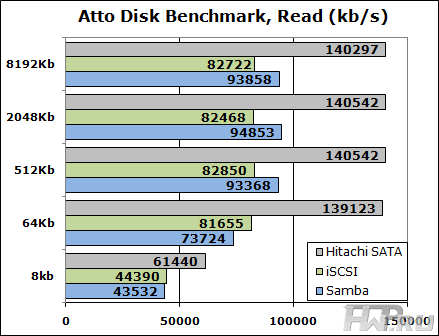
The first reading test, in general, surprises that ideologically faster iSCSI connection can be outperformed by Samba on large blocks. It looks like this is an iSCSI miniport issue in the server. Let's see what's on the post.
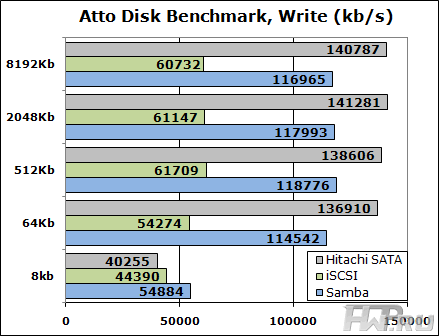
Here the picture is painted by the built-in caching when working with Samba. Thanks to it, recording on Thecus N5200XXX is as fast, and sometimes faster, than on a local disk. Of course, these are synthetics and live results will be different. Let's move on to a more realistic test - Intel NAS Performance Toolkit. We ran this test under Windows XP, reducing the amount of RAM on the test system to 1 GB.
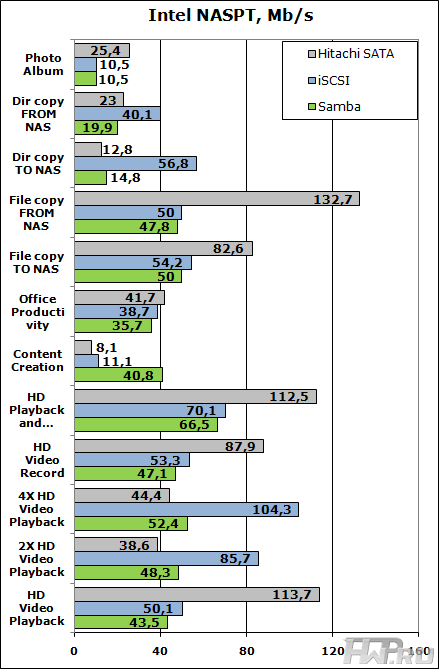
The results here are extremely ambiguous. I wonder how the read performance grows with an increase in the number of threads on the iSCSI connection, when the built-in hard drive starts to choke. But when copying data to the NAS, caching via SMB protocol does not help, and here we see the real advantage of iSCSI.
Let's move on to the real problem - let's go back to Windows 7 and measure the time it will take to scan a large directory with heterogeneous files for viruses. To do this, we will use the Avast! Antivirus, since, unlike NOD32 or Kaspersky, this antivirus has a minimum error in scanning time. NOD32 periodically stopped during tests and could wait a few minutes for some unknown reason, checking a regular file. Kaspersky could check the file directory for the first time in 9 minutes, and the second time - the same directory in 20 minutes. Avast! has no such problem. Antivirus scanning puts a heavy load on the client machine, but our computer is powerful enough, and don't forget - this is a real test.
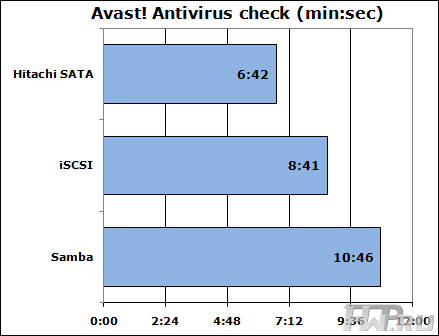
Well, actually, in spite of synthetic tests, we see real read performance. Almost a two minute difference, like a ruler. There is nothing to add or add here.
Almost the opposite of the previous test. If Avast! read data from the NAS to check for viruses, then Acronis Backup & amp; Recovery 10 will write to the NAS, doing its main task - a backup of our test folder. In the settings of the Backup task, we set the maximum priority for the task and two compression levels - normal and zero, that is, data recording without compression. Testing on the built-in hard disk had to be excluded from this test. we didn't have a second hard drive of the same kind at hand.
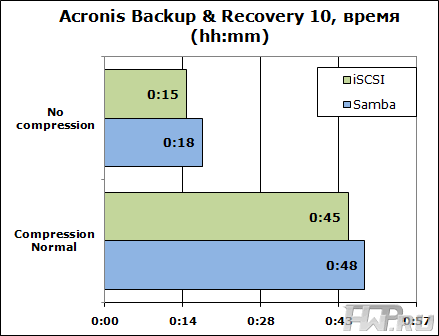
The difference was 3 minutes in both cases. In absolute terms, these are insignificant differences, so we can say that technologically there is no difference between the type of interface for backups. Of course, a serious load falls on the client machine, and if you are going to use the NAS for direct backup of weak office machines, then you don't have to think about how efficient this NAS will be.
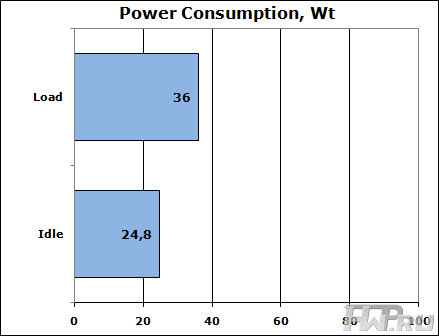
Let's look at the power consumption. The results surprised us - the Thecus N5200XXX consumes almost 25 W without drives, which is very little for a NAS of this level.
Conclusions
Thecus solutions are always clearly priced in order to occupy their niche strictly for a certain type of user. Judge for yourself: as many as 5 bays for HDD, which when using 3TB drives allows you to shove 15TB of data into a box, support for all RAID arrays, iSCSI support, VMWare and Citrix certificates. These characteristics are enough for most business users who choose NAS for their business, and the low price is another reason not to postpone the order while the equipment is in the supplier's warehouse.
Thecus N5200XXX is a competitive product, very fast, which, as you can see, in many tests is not inferior even to a fast SATA hard drive.
Mikhail Degtyarev (aka LIKE OFF)
07/07.2011