Review of Thecus 1U4200XXX 1U rack storage
Not every manufacturer has 1U rackmount storage systems, since many customers are guided by NAS volumes, and you can't install more than 4 disks into such servers. However, entry-level NAS can be used as staging storage, a shared folder server, or for backing up multiple workgroup servers. In the case of Thecus products, you can find other uses as well - launching a corporate website, a business process management system, or backing up another NAS.
Be that as it may, but four-disk rack storage systems are in steady demand among small businesses, and today we will consider a striking representative of the series, one of the most affordable solutions with a fault-tolerant power supply from Thecus.
Thecus 1U4200XXX Distinctive Features
The entry-level network storage system is built on the basis of Intel Atom D525 processor with a frequency of 1.8 GHz and has 1 GB of DDR3 memory without the declared upgradeability, although who is stopping you from replacing the module yourself? :). For modern office-class NAS, such an element base is the norm today.
Specifications:
-
Processor - Intel Atom D525, 1.8 GHz
-
Memory - 1GB DDR3 SODIMM
-
2 network ports RJ45 10/100/1000 Mbps
-
Possibility of channel aggregation
-
5 USB 2.0 ports, 1 front, 4 rear
-
4 x SATA-300 ports for 4 x hot-plug hard drives
-
RAID 0,1,5,6,10 and JBOD support
-
Ability to create multiple RAID arrays
-
1 eSATA port
-
250W Fault Tolerant Power Supply
-
Temperature control of fans
-
RS232 port for UPS connection
-
iSCSI Support with Thin Provisioning
-
Video surveillance server for 5 IP cameras
-
Mail Server
-
Web server
-
Tilting LCD screen with status information
-
Bundled with Acronis True Image
The storage system comes complete with a rack rail, which is generally the norm today. But the presence of a disc with Acronis True Image software in the box is a great surprise for a small company.
Design Thecus 1U4200XXX
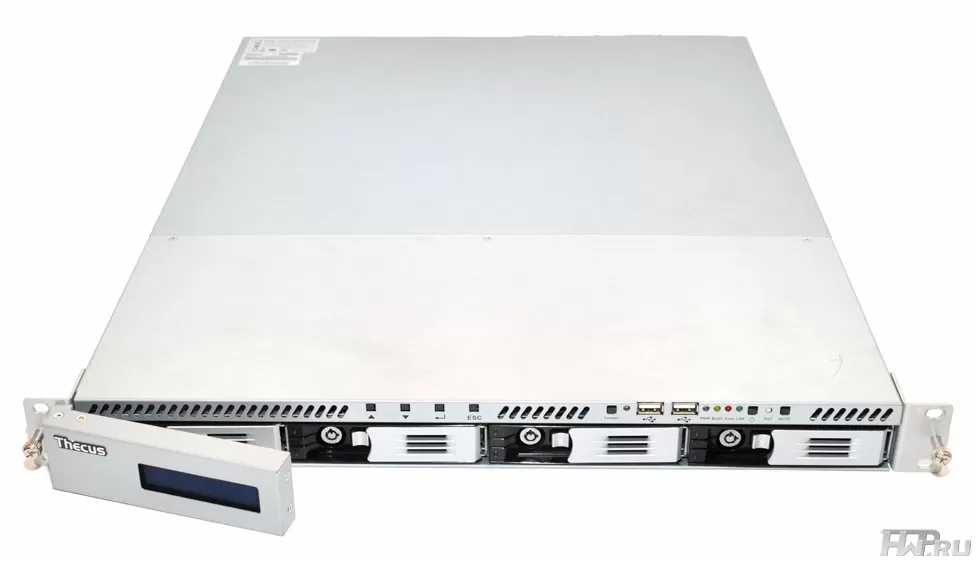
In 1U storage systems, manufacturers, as a rule, have nowhere to roam - the entire front panel is given to accommodate four trays for 3.5-inch HDD (installation of 2.5-inch disks is also provided), which has already become mandatory for The Thecus LCD screen was placed on a swivel casing so that it doesn't take up space.
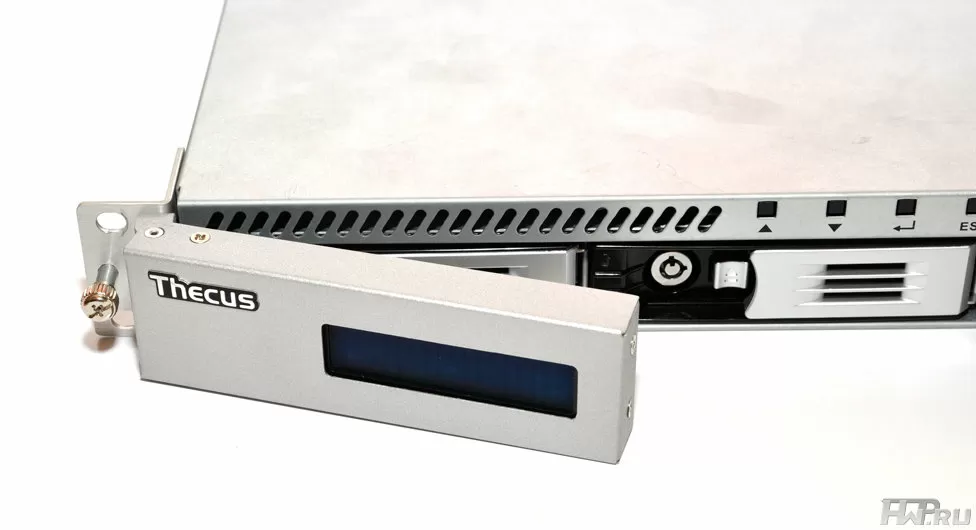
The entire front side of Thecus 1U4200XXX is made of metal, leaving only space for the plastic in the hard drive trays. By the way, the trays are the same as in all other Thecus NAS-ah, namely - almost perfect, with easy snapping, easy removal and completely eliminating distortion during installation.
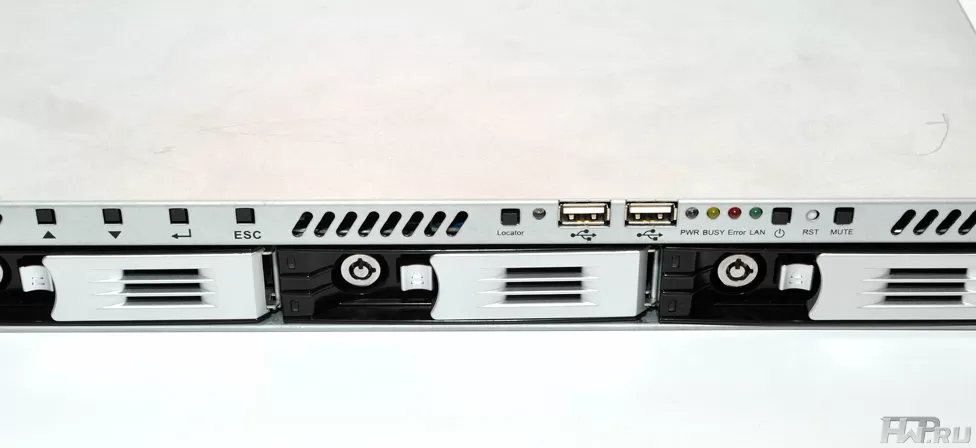
The Thecus 1U4200XXX's main indication is displayed on the LCD. I don’t know what will happen sooner - we will understand why Asian manufacturers are so fond of black font on a blue backlit screen, or they will start caring about those who do work with servers and make at least a white or greenish backlight. In general, it is ugly. In addition to the screen, you also have access to standard LED indicators - power, network, error, boot (Busy) and Unit ID. In the middle of the case there are four buttons for controlling the NAS from the screen.
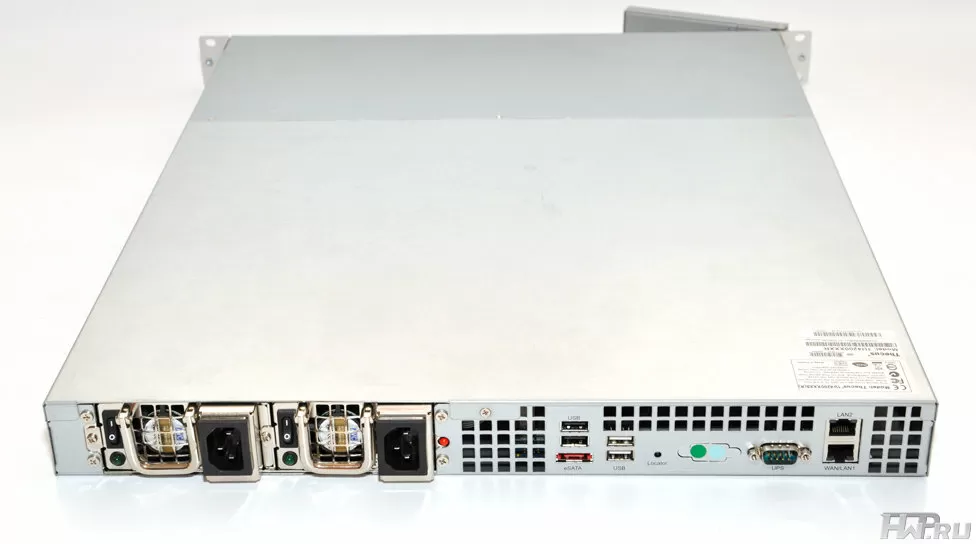
Considering the low power consumption of Thecus 1U4200XXX (there is simply nothing to consume a lot of electricity), then the standard front-to-back cooling scheme enough for the eyes and on the side there are ventilation holes in the back where the power supplies are installed and there could be expansion cards - you don't need more.
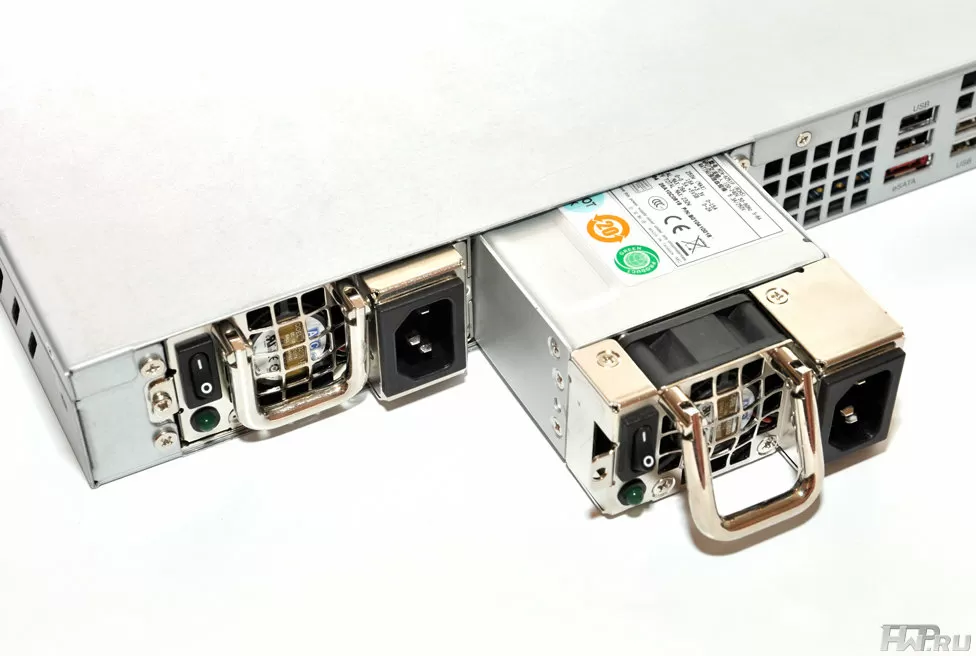
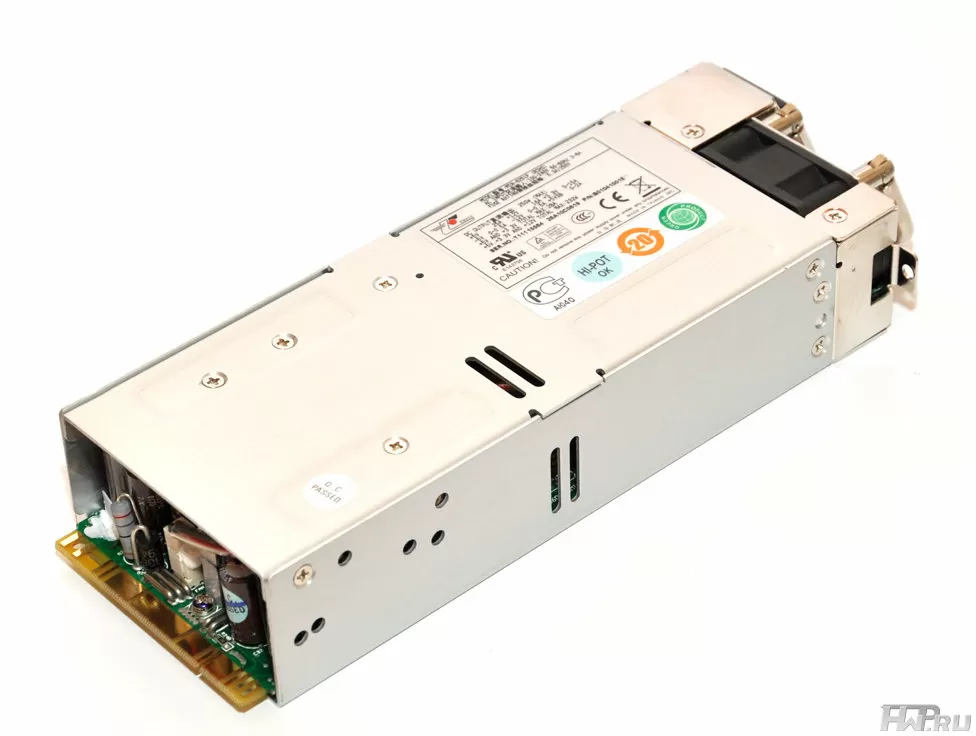
Thecus NAS 1U4200XXX is available with a regular 200W or fail-safe 250W power supply. It was a model with a two-module power supply unit manufactured by Emacs, a well-known Taiwanese manufacturer of server power supplies, which came to us for testing. Each PSU has its own on/off switch and is screwed in so as not to fall out during transportation or if someone accidentally pulls on the wrong cable - I would prefer to see the option of installing the PSU with a latch, although this does not really matter. Each module has its own LED indicator, so if something happens, you can immediately see which one is having problems.
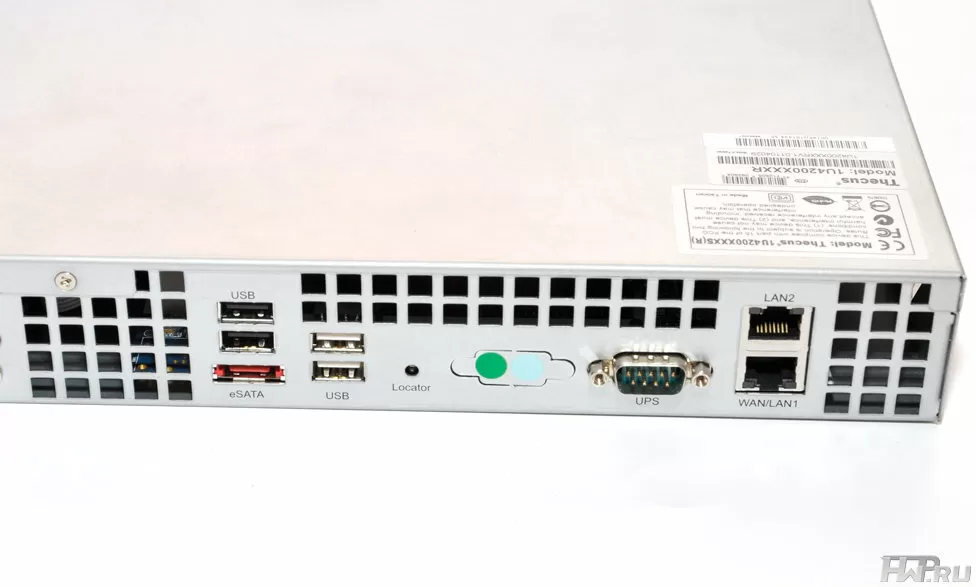
For 1-unit storage systems, Thecus 1U4200XXX has quite a lot of USB 2.0 ports - as many as 4 on the back side, as well as rudimentary RS232 for an uninterruptible power supply. Two ways to connect the UPS - a good opportunity to fully utilize even existing old equipment. The eSATA port is also located on the back, so you can use the external eSATA HDD shelf as a capacity expansion module.
Please note that Thecus does not manufacture these modules.
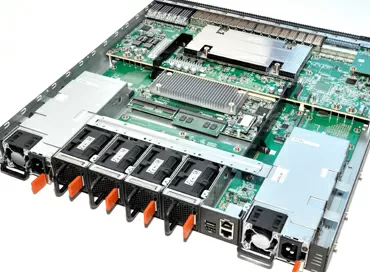
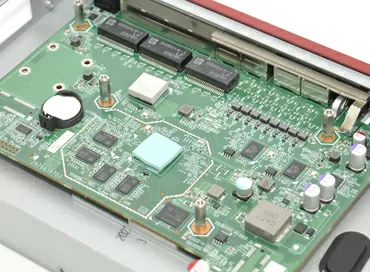
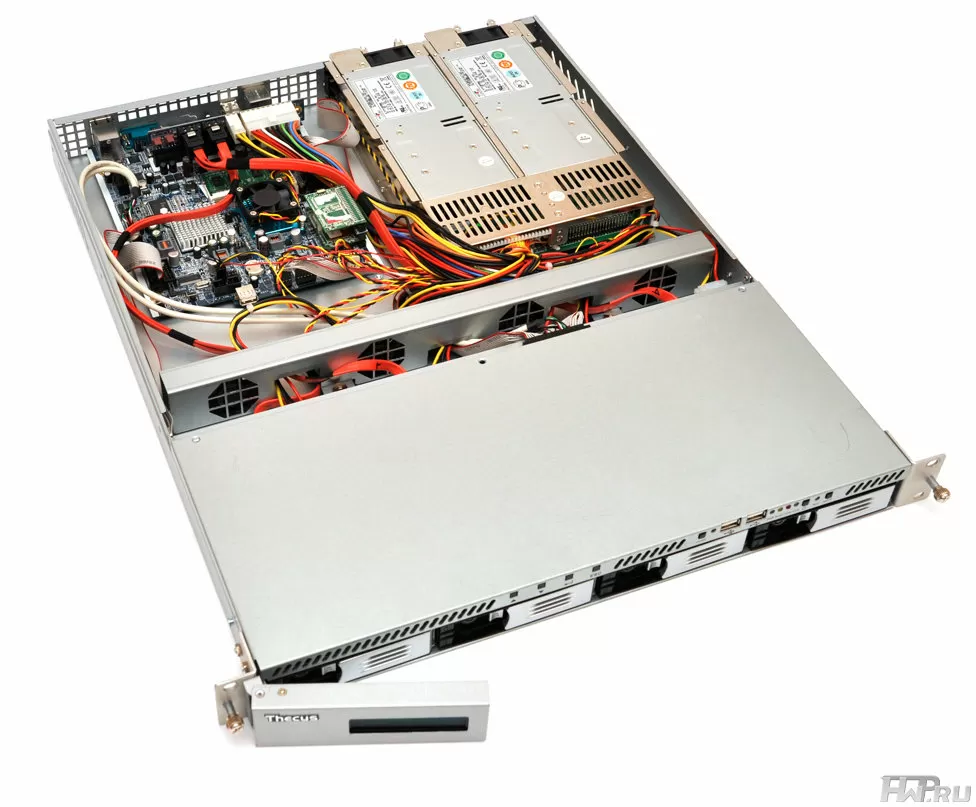
Let's look at the internal structure of Thecus 1U4200XXX. Everything is extremely simple here - no niches for cables, no expansion cards. The hard drives are connected to the Backplane, and the motherboard is a slightly modified version of the same one used in Thecus NAS> Most of the connections are made to the riser in the middle of the board: here you can find unused fan headers, SATA ports, and ATX power. Under the cables and wires extending from the riser, one SO-DIMM slot with a memory module is hidden. Officially, Thecus 1U4200XXX does not allow memory upgrades, so we will not focus on that.
Near the network ports, there is a PCI Express 1x expansion port, which here is like a window against a wall: no matter how hard you try, you cannot install even the smallest card into it. True, in such NAS-ah it is not required.
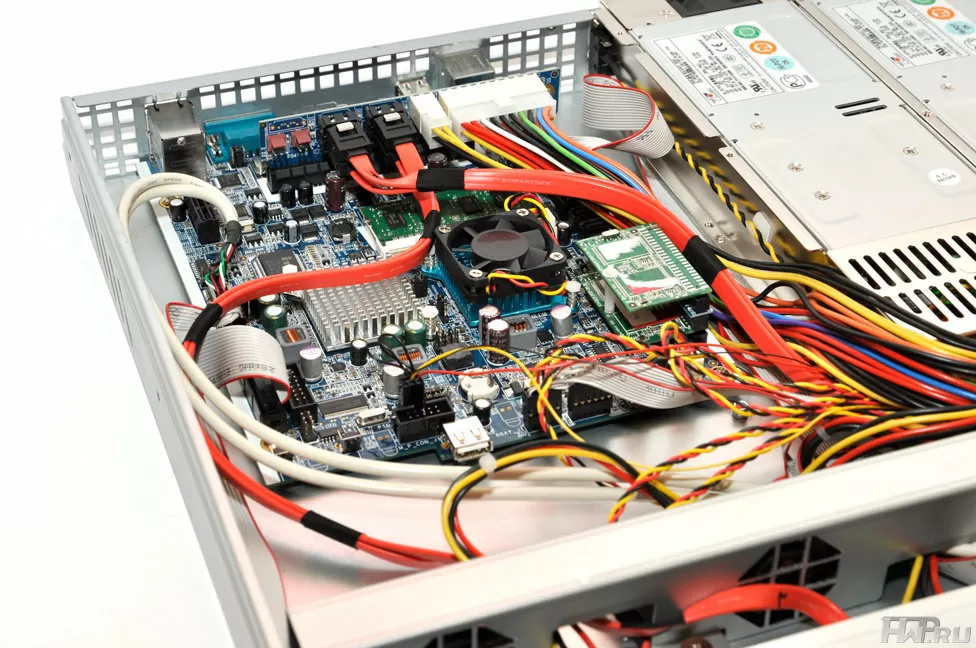
The motherboard has a dual DOM (Disk-On-Module) for storing firmware - a proprietary Thecus function. It allows you to back up the firmware in case of damage during its upgrade. Let's also pay attention to the unoccupied internal USB 2.0 port, which, if desired, can be used for a USB flash drive with keys, which is better hidden inside the steel case of the server.
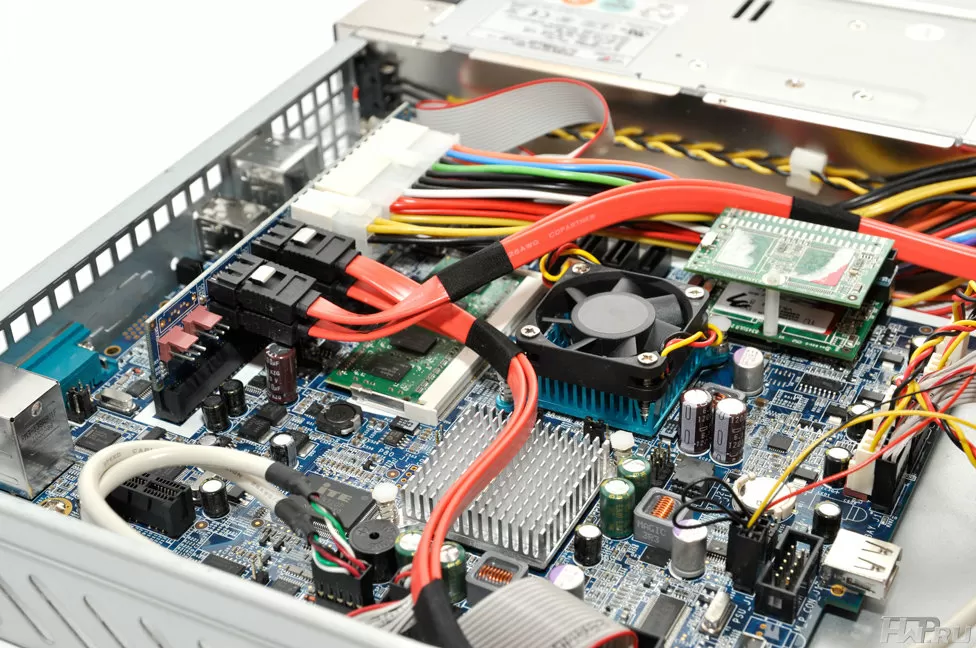
The motherboard takes up less than a quarter of the space of the NAS, and even the power supplies have more space than the electronics.
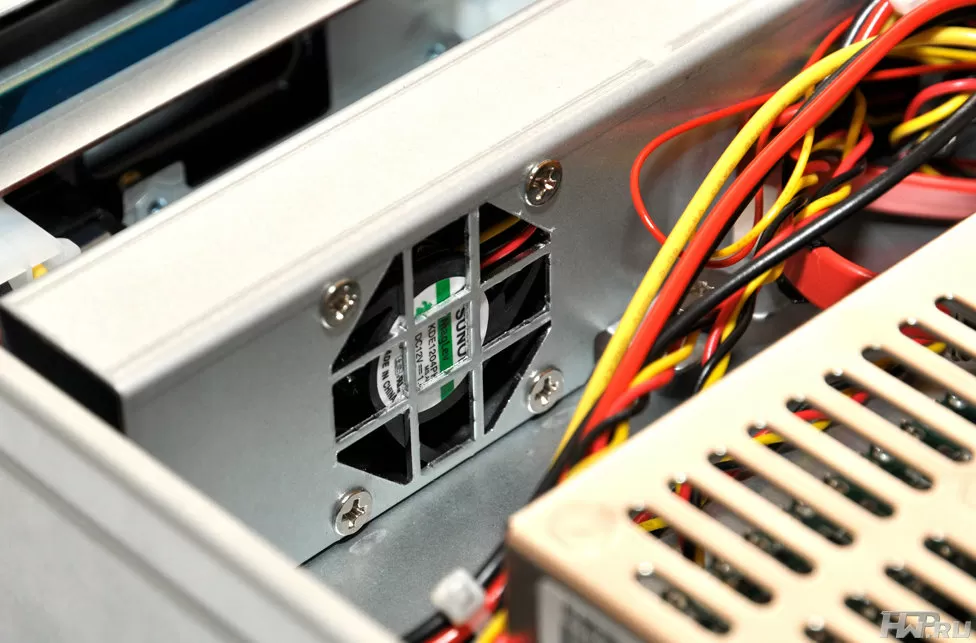
The case is ventilated by four Sunon KDE1204PKVX fans with dimensions 40x40x20 mm and 1.4 W each. At a maximum rotational speed of 8200 RPM, each of them pumps up to 10.8 cubic feet of air per minute, and with such a cooling scheme, it is not clear why it was necessary to install a small fan on the processor as well. It's nice that the fans have a magnetic rotor suspension, and the cooling unit is mounted on rubber dampers to reduce vibrations transmitted to the case and hard drives. The NAS electronics constantly monitor the system temperature, but we did not notice the fan speed control.
Two Intel WG82574L gigabit controllers with PCI Express 1x interface are used to work with the network - the most common solution in NAS of this class and starter servers.
In general, we can say the following about the design of Thecus 1U4200XXX NAS: the manufacturer still spares no metal for their NAS, as if they were not designed to work in closed server cabinets with climate control , but in an open field or in a dirty industrial workshop. This adds confidence that the storage system will endure operation in difficult conditions, because in some companies a complete mess can be created in the server room - servers sometimes lie on the floor or stand near the wall. Anyone who has worked in such companies understands that the rigidity of the case is of great importance for the server. However, the factory was too lazy to collect numerous wiring and cables into bundles and lay them along the case, hoping that the user would not need to look inside. But if you do this, you will significantly improve the air flow in the case, thereby improving cooling. It is very important that the motherboard has two DOMs, and the workmanship is traditionally not satisfactory.
Software features
Thecus company, unlike its competitors, strives to offer the user the maximum of functions in a standard package, without forcing them to buy something else. For example, you can use Thecus 1U4200XXX as a video surveillance server for 5 IP cameras, although it will not work to expand their number - if necessary, you can simply use Thecus 1U4200XXX as an FTP server to store archives of records from IP cameras and any other devices. For use in critical applications, a Level 6 RAID array is supported, which can withstand the loss of any two hard drives. The built-in TFTP server will allow you to boot diskless work machines, the Syslog server will keep a centralized log of system events from different devices.
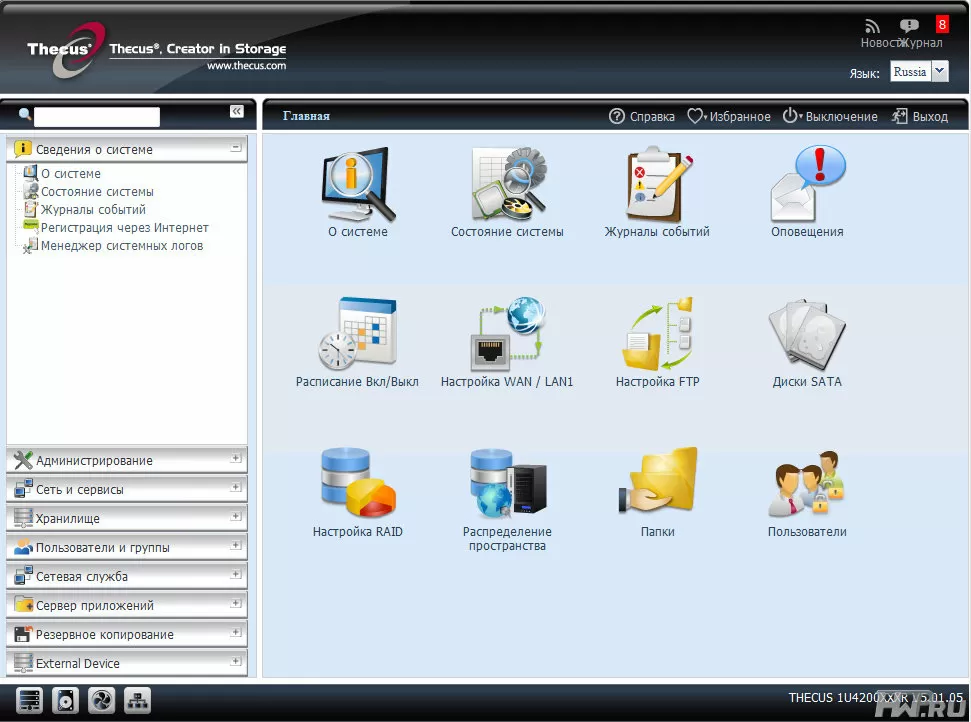
Thecus remains one of the few NAS vendors to support ZFS, although one of our tests has shown it doesn't make much sense - better use the more practical EXT4.
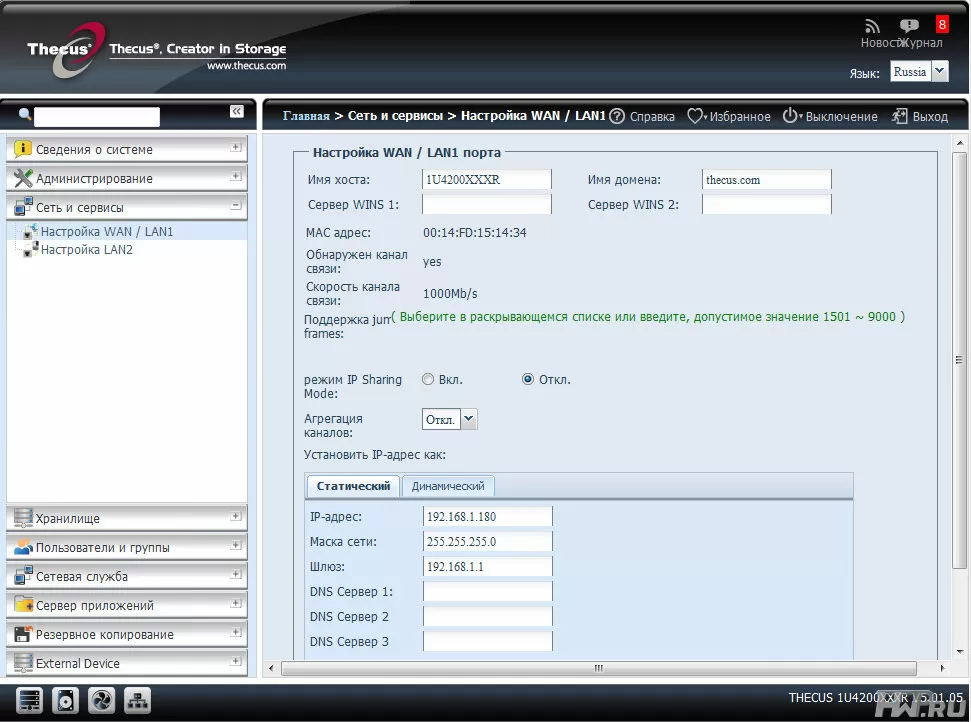
Any settings and management are made only through the Web-interface, and to control the server parameters in the enterprise there is support for the SNMP protocol, everything is aimed at convenience and rationality.
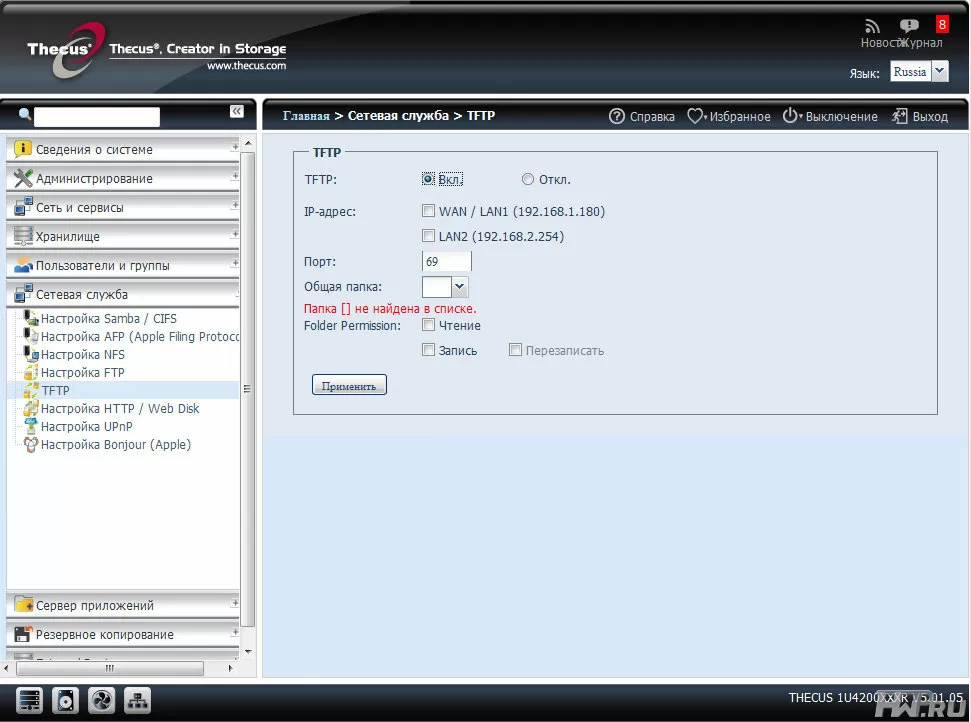
Of course, those who buy Thecus 1U4200XXX for storing and creating backups will appreciate the support for file system snapshots, native RSync support and various backup methods. And the free delivery of Acronis True Image in the bundle, as already mentioned, is a significant bonus.
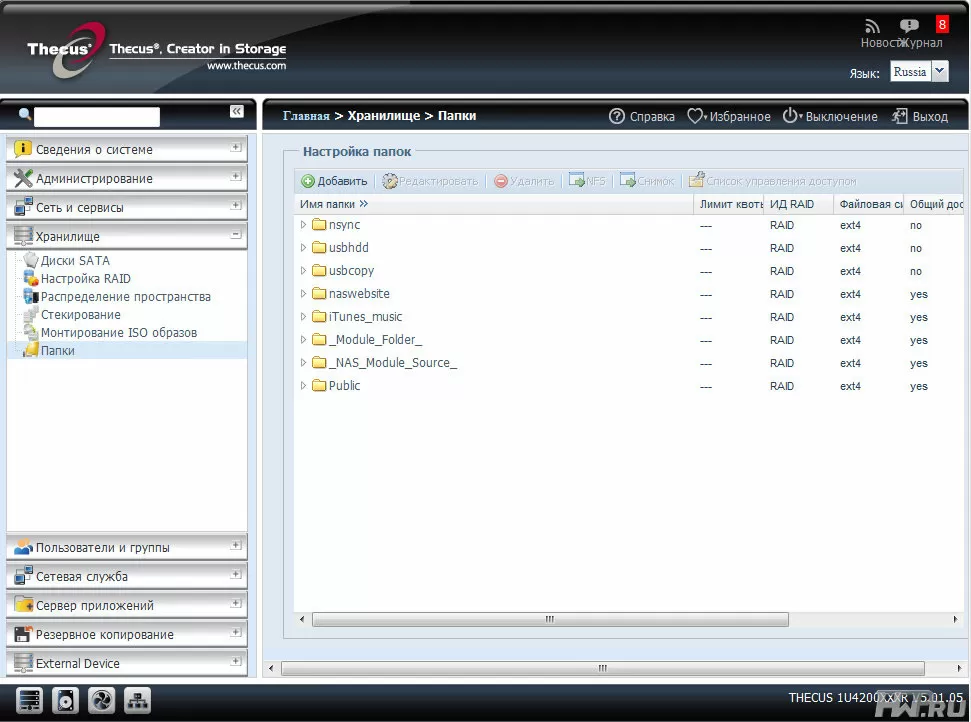
The iSCSI volume is created on an unallocated area of the RAID array, which does not allow changing its volume while the NAS is in operation. So we recommend that you leave an unallocated area with a margin in advance during the initial installation, and this is more convenient - with the support of iSCSI Thin Provisioning, you can give your iSCSI targets as much free space as you need.
Well, the feature of modern office-class NAS, the ability to install additional modules, is fully presented here. By the way, to use the multimedia album, you can install the application on your mobile phone, and later download and view photos without a computer - directly from the iPhone.
Testing
We installed four Western Digital RE4 2 Tb hard drives in Thecus 1U4200XXX and combined them in RAID 5 with EXT4 file system and default settings.
For testing, we used a client computer with the following configuration:
-
Intel Xeon 3220
-
4 Gb RAM
-
Asus P5B Deluxe
-
Hitachi HDS721010CLA332 1Tb HDD 7200 rpm
-
Windows 7 Ultimate x64
The computer connected to the NAS using the switch
Let's start with synthetic tests.
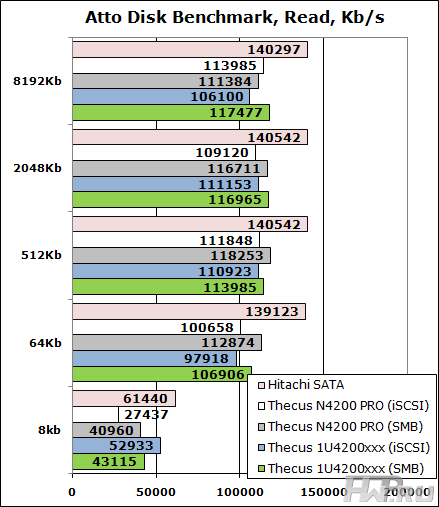
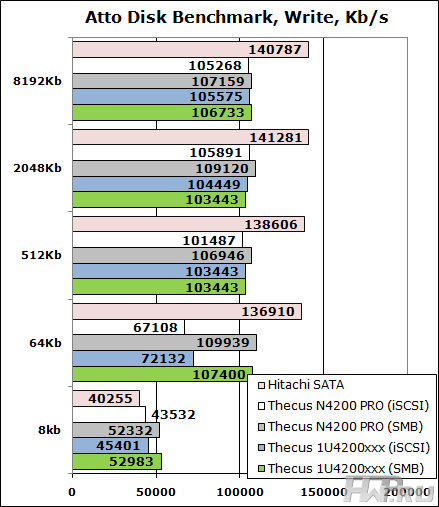
Comparing the results with the recently tested Thecus N4200 Pro, we can say that the models are identical, and small differences more look like measurement errors. Good linear reading scores.
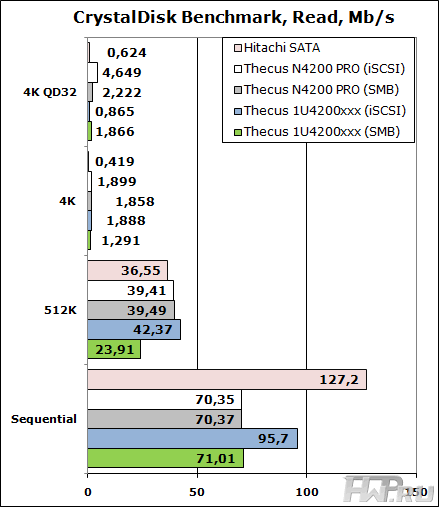
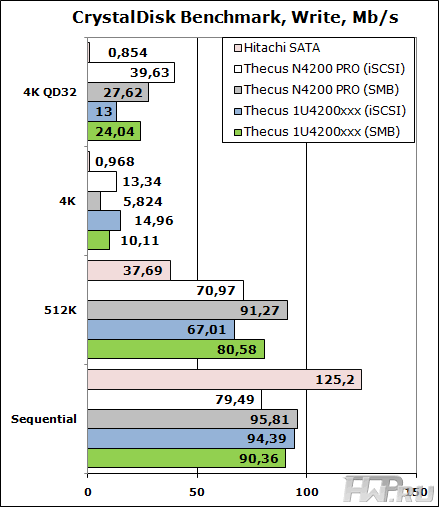
Thecus 1U4200XXX demonstrates poor performance on a long queue of commands (4K QD32 test), although it is better than a single hard drive. The NAS showed itself well in both sequential reading and random writing of 512K blocks. But we cannot highlight any advantage, for example, the iSCSI protocol or vice versa, Samba.
Acronis Backup
Let's move on to the real tests. We start with the Acronis Backup & amp; Recovery 10, which copied a folder containing 11,520 miscellaneous files with a volume of 54.2 GB to the NAS from a local disk. File compression was not used, and since we only have 1 hard disk in the system, we will not backup ourselves from it to ourselves for tests.
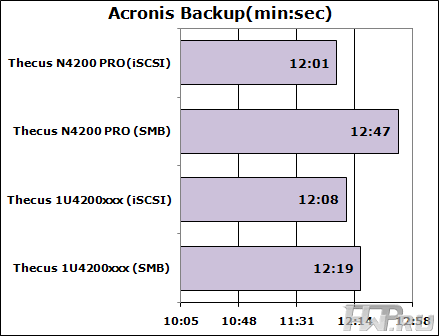
The Thecus 1U4200XXX storage system shows good results, in general, it does not matter what protocol is used for backup - via iSCSI or via Samba.
The anti-virus uses preferential reading from the media, so when checking the same test folder, we can get more important results that allow us to compare the performance of devices.
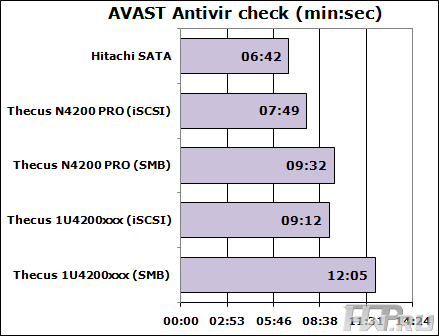
But in this test, Thecus 1U4200XXX completely merged when working with the Samba protocol, although synthetic tests did not give us the right to suspect the device in such results. Be that as it may, this is definitely some kind of flaw in the firmware, and I think the manufacturer will fix it soon.
Power Consumption
We measured the storage's own power consumption when connected with two power supplies at rest, when all internal servers were turned off, and under load - running tests. Cooling fans consume most of the energy in entry-level storage systems.
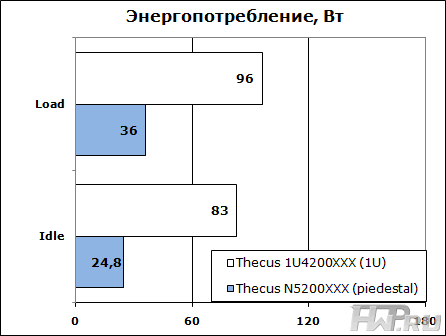
The power consumption of Thecus 1U4200XXX could have been lower if the fan speed control had been working.
Issue price
The average retail price of Thecus 1U4200XXX with a backup power supply is 52,000 rubles. But the same modification with one power supply unit will cost the customer 38,000 rubles, of course, without disks. For comparison, the main competitors - Synology RS810 + and QNAP TS-459U SP + cost 50,000 and 48,000 respectively, and this is with one power supply. If you need to provide fault tolerance for power supply on the Synology RS810 (model with the RP + index) - this is 66,000 rubles, and for the QNAP TS-459U RP you will have to pay 63,000 rubles. Thecus products have always been very interesting in terms of price, and in 1U storage systems, the trend has continued, which cannot but please the buyer! Considering today's rising prices for HDDs, the opportunity to save on data storage will come in handy.
Conclusions
Thecus 1U4200XXX remains one of the most affordable rack-mountable 4-bay all-in-one NAS. At the same time, you get fairly good performance and functionality, like an inexpensive desktop model Thecus N " On the one hand, we expected to be able to install an expansion card to work in 10G networks. But on the other hand, fierce competition and strict marketing make it clear that there will be no freebies. Compared to its desktop counterparts, the 1U4200XXX model has a more reliable cooling scheme (N + 1), a fault-tolerant power supply, and real scalability - because you can stack these storage systems as your business grows. And unlike the desktop model, you won't have the question of where to put it.
Robust rigid case, reliable and simple mechanisms for HDD trays, excellent functionality, scalability and support for fault-tolerant configurations. It is an excellent storage system capable of meeting customer requirements for fault tolerance and support for virtualization platforms.
Mikhail Degtyarev (aka LIKE OFF)
16/11.2011