NetGear ReadyNAS 3200 - 12-disk industrial storage
Today NetGear products are known to many ordinary consumers and corporate customers. The company specializes in networking equipment and has a wide range of products, from network media players to firewalls and corporate anti-virus solutions. Naturally, it is not easy to maintain leadership in such vast areas, especially when it comes to complex corporate storage systems, where competitors are not so much QNAP or Thecus as IBM, HP and Dell.
Today we will devote our review to the industrial storage system NetGear ReadyNAS 3200, which is very powerful in terms of the hardware used. Suffice it to say that this is one of the few storage systems that supports 12 drives in a 2U chassis. Today this means 24 TB of data in one device. Then you can talk as long as you like about the unprecedented storage density, efficiency and economy, but let's leave that to marketers.
Key features of NetGear ReadyNAS 3200:
-
2-core Intel Core
-
4GB RAM with ECC
-
Real server hardware
-
12 SATA II channels
-
Two 10/100/1000 Ethernet ports with load balancing and failover capabilities
-
Two USB 2.0 ports on the back
-
Two power supplies in a failsafe configuration
-
Disk system:
-
Ability to create multiple RAID 0, 1, 5, 6, 10 volumes
-
X-RAID 2 double parity support
-
Expand volumes without shutting down the system
-
Advanced Volume Management
-
Supplied with Enterprise hard drives, fully operational system
-
-
Back up
-
Snapshot support
-
Remote backup to CIFS, NFS, HTTPS and RSync target
-
RSync mode
-
Cloning between multiple systems
-
Apple TimeMachine Support
-
-
Certificates "VMWare Ready", certified for Windows Server 2008 R2
-
Dimensions 89x437x648 mm
-
Weight with 12 discs - 32.8 Kg
-
5 years warranty
The manufacturer does not say what processor it installs in the server, limiting itself to the vague “multi-core Intel processor. But we found out that this is a Core2 Duo E7400, a 2-core processor with a frequency of 2.8 GHz, a cache size of 3 MB and a FSB frequency of 1066 MHz. Great processor for NAS.
NetGear is one of the few manufacturers who continues to supply their systems with hard drives (although you can buy a diskless model as well), and does not give a distributor or integrator a choice of HDD. With a small overpayment compared to buying drives on your own, you get, firstly, tested and compatible HDDs, and secondly, a single guarantee for both the device itself and its hard drives. The manufacturer's website says that the ReadyNAS 3200 comes with WD GP series hard drives, not the best choice for RAID arrays. The machine came to us for testing with WD RE3 hard drives, the top WD series for RAID arrays is the best choice (it is also known that 2-terabyte Hitachi Ultrastar A7K2000 hard drives are also installed in NAS). This is where the nice features just start. By default, the drives are already configured in the X-RAID2 RAID array, and you don't have to waste time even initializing the device - fully living up to its name, the ReadyNAS works right out of the box. Well, it will not be superfluous to remind you that in the set with the NAS you will receive rails for installation in a rack and a disk with installation instructions.
What is also worth paying attention to is the use of server components in the design of the NAS. This is not the case for other entry-level enterprise storage vendors, but we'll talk about that now.
NetGear ReadyNAS 3200 Design
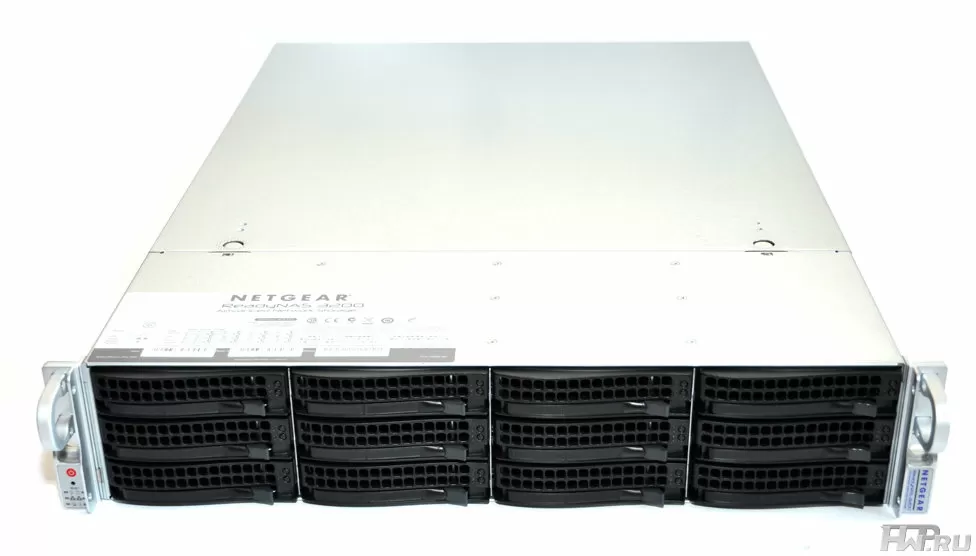
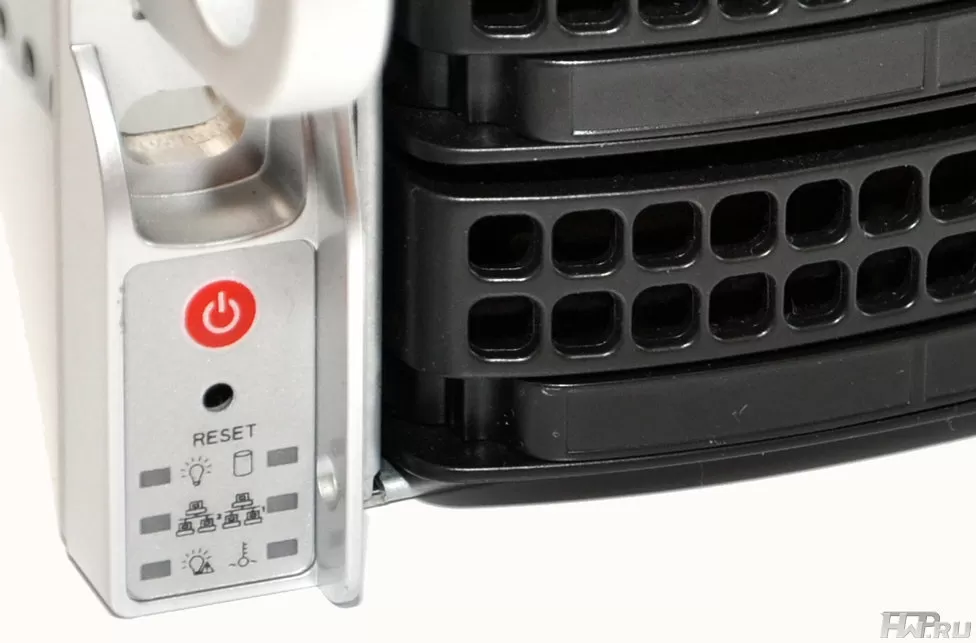
Externally NetGear ReadyNAS 3200 looks quite modern. The ability to install 12 disks in a 2U case has existed for a long time, but for some reason NAS manufacturers ignored it, although logically they should have been the first to grab onto it. As a payment for superdensity - minimal status indication, placed on the left handle of the case and the complete absence of ports and displays on the front panel. We will not go into reasoning about whether they are important in rack-mount equipment. Let's just say that the Reset button is pressed with a paper clip or a pen, and 6 LED indicators show the status of the network, disk system, temperatures and status messages.
Trays for hard drives are made of plastic and metal, they have a very successful design, which excludes distortions or sticking of drives in the case. The only drawback of the design is that the installation of the disk is not always clear, and you can “not connect” the HDD, especially if it is difficult to see and you are in a hurry. Plus, if you pull out two discs at the same time, they cling to each other. The disc trays look very familiar - this is SuperMicro!
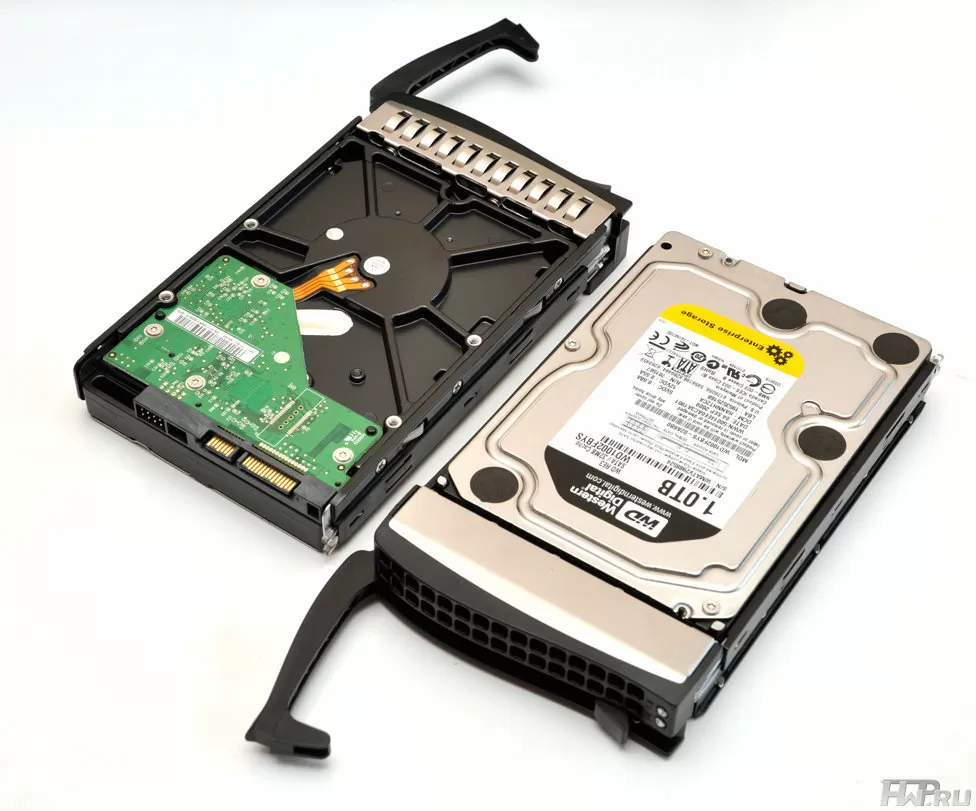
Yes, it is not necessary for rack-mount products to develop their own platform when you can use the successful solution of SuperMicro, a company that knows how to achieve maximum density per rack unit (see our overview ).
Cooling of NetGear ReadyNAS 3200 is carried out according to the classical scheme - air intake is carried out strictly from the front, through the HDD bay, and air is removed from the rear with partial pressure reduction in the middle through the side walls. This configuration is equally well suited for open rack and server enclosures.
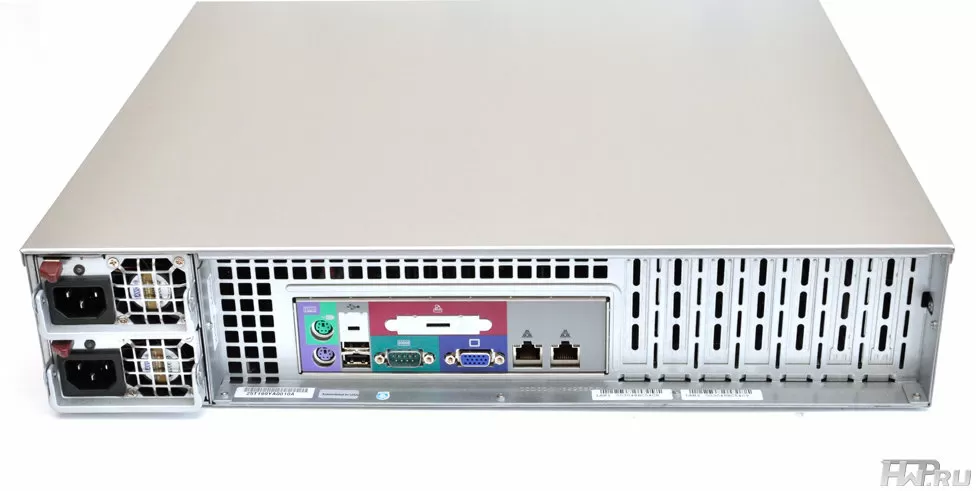
Let's look at the NAS from behind. One of the advantages of the ReadyNAS 3200 is its 700W fault-tolerant power supply. It is manufactured by Ablecom, a server chassis and power supply company that is a longtime supplier of SuperMicro. There are 7 slots for expansion cards on the case, but the motherboard will hardly allow using all the expansion options.
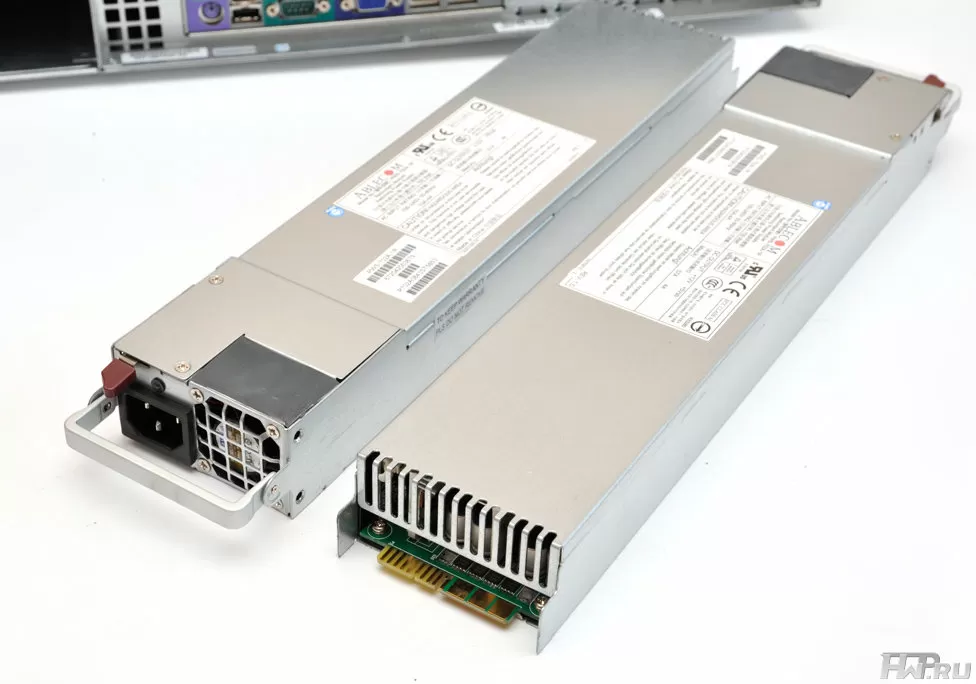
The motherboard has standard server connectors, including 2 USB 2.0 ports, two network ports, PS/2, RS232 and VGA ports. Accordingly, the administrator will be able to get console access to the server, but there could be more USB ports. As for the console access, the possibilities are limited only by access to the BIOS, since the operating system RAIDiator 4.2.16 does not allow access from the connected console.
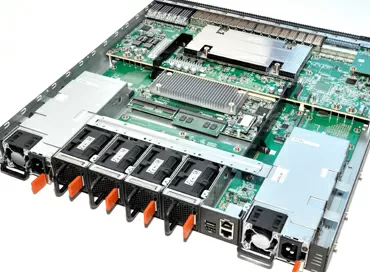
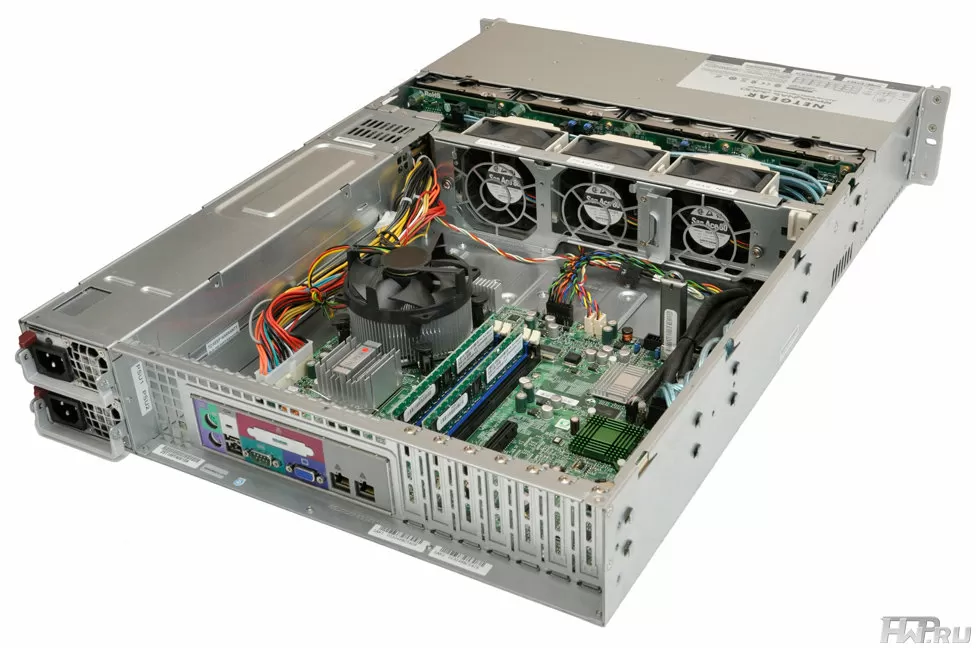
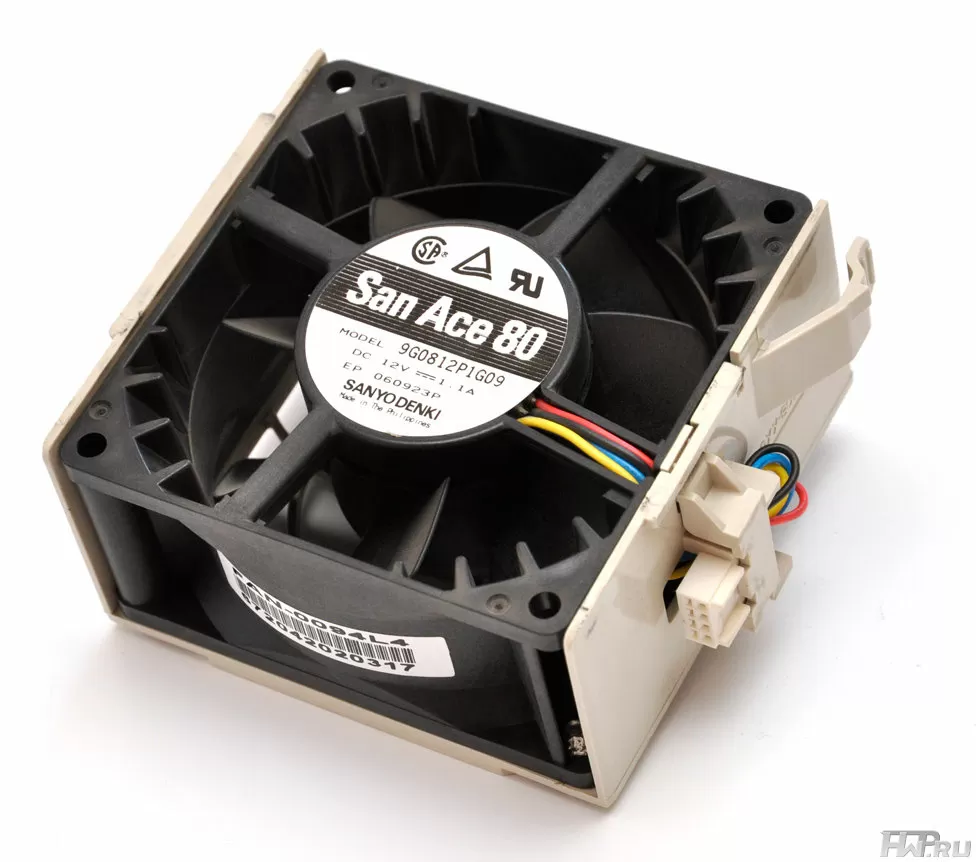
When you open the cover of the NetGear ReadyNAS 3200, you immediately see that you are dealing with a real server. The hard drives are connected via the Backplane and are cooled by three hot-swappable 80mm Sanyo Denki 13W fans.
They have enough airflow to blow through the entire hull, but there are only three of them, so they are fast and noisy. It's a good thing that high-quality Sanyo Denki fans do not vibrate. the housing has no vibration damping.
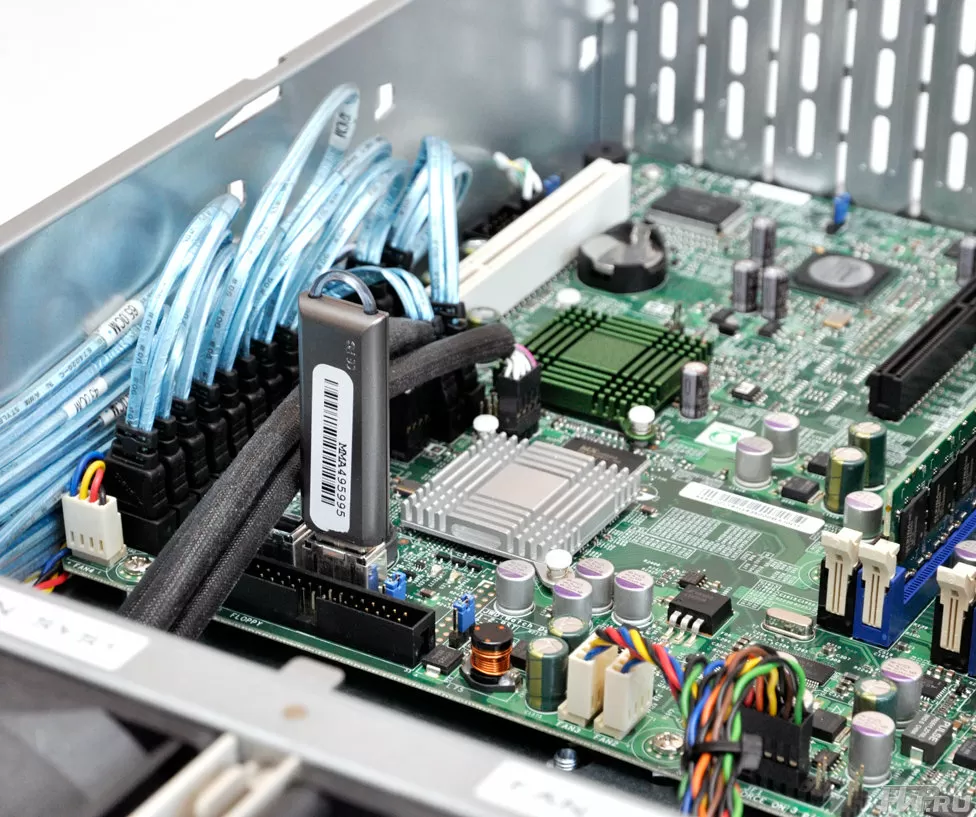
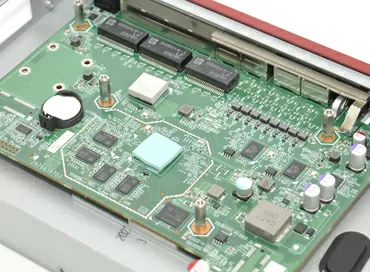
Motherboard - SuperMicro X7SB3-NI015 using Intel 3210 chipset with ICH9 Southbridge. One of the built-in USB ports is given for a flash drive with a storage operating system - a simple and straightforward solution. Obviously, for greater reliability, the USB stick can be cloned, and the second internal port can be used for hardware keys.
The motherboard has sufficient expansion options: one PCI 32 port and one PCI Express 8x port. You can install, for example, a 10G network controller, a hardware RAID controller, or add USB ports - if only NetGear's RAIDiator operating system supports this.
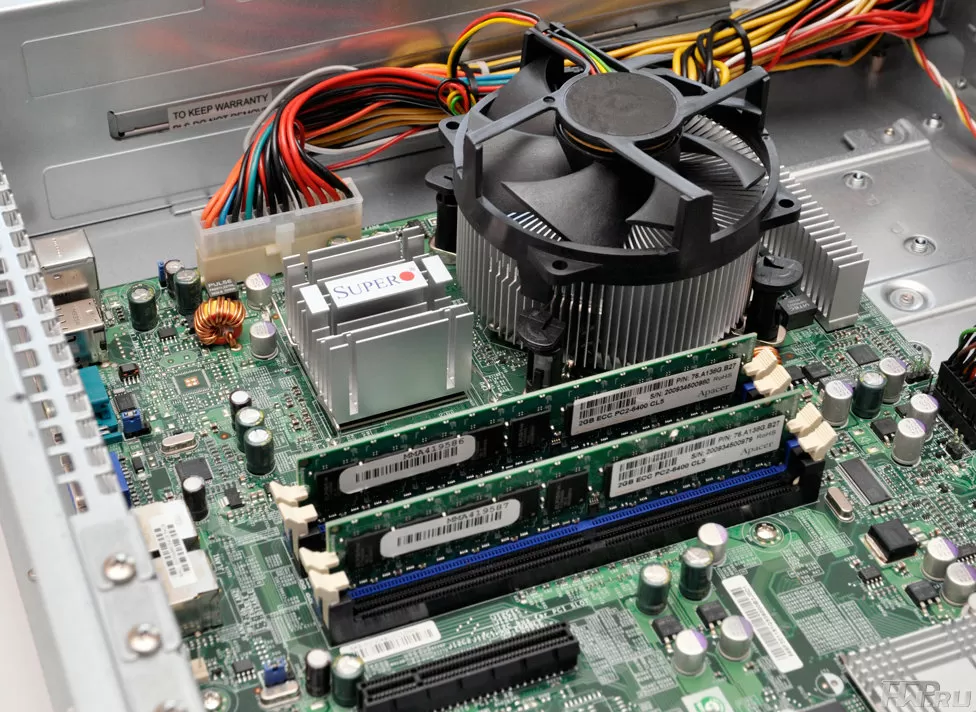
Another nice thing - 4 GB of memory are filled with two DDR2 SDRAM slots, and the maximum amount supported by the motherboard is 8 GB, so you can easily upgrade.
And one more very promising feature - the built-in LSI 1068E controller has 8 SATA/SAS ports! And this feature is implemented in the BIOS, but SAS is not supported by the RAIDiator operating system, so if SAS appears, it will only be in the distant future.
Setup and Programming Features
Year after year NetGear has been improving its operating system RAIDiator, and we are already testing the 4th generation of version 4.2.16. Since the ReadyNAS 3200 comes pre-configured, all you have to do is change the administrator password and configure the network settings. To find a NAS on the network, it's easier to use the RAIDar utility, or go to the menu of your router.
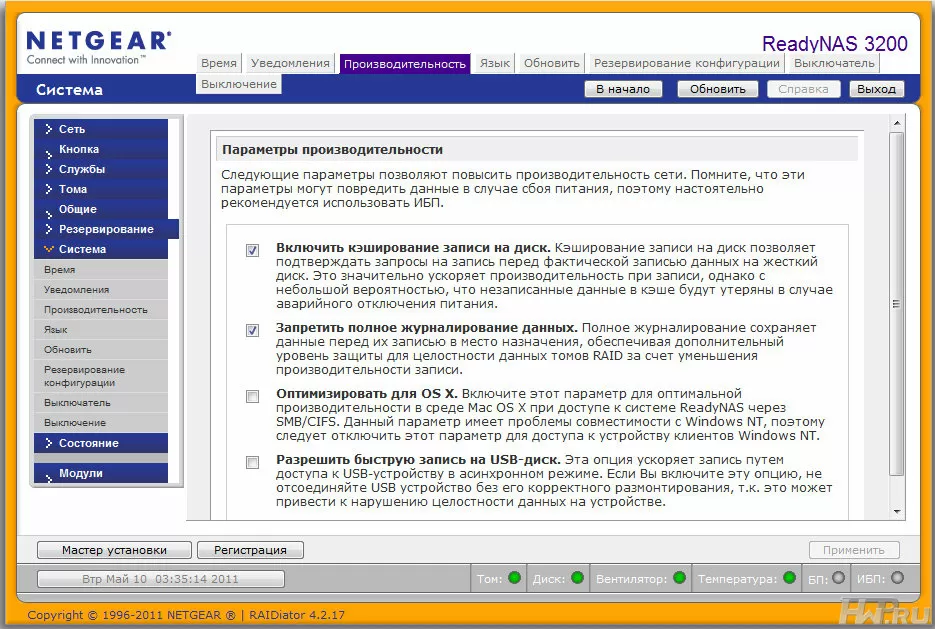
The web-interface of the server is frankly inconvenient, and besides, horizontal scrolling is often required, and there are no such simple items as the Web-file manager at all. However, with a little getting used to it, you will easily find familiar business storage settings.
An interesting feature of the system - you cannot change the settings of the main volume through the Web interface, including the type of RAID array, the volume and number of volumes, etc. This is due to the use of the X-RAID2 mode & ndash; it works purely as a single volume and focuses on ease of use and extensibility, not flexibility. If you reset the server to the default settings and select the Flex-RAID mode, then it will just allow you to create up to 4 volumes of different RAID levels. For the sake of fairness, we note that X-RAID2, chosen by the manufacturer by default, will satisfy the requirements of most users, will allow the array to be scaled by adding new disks, including smaller ones, than previously used.
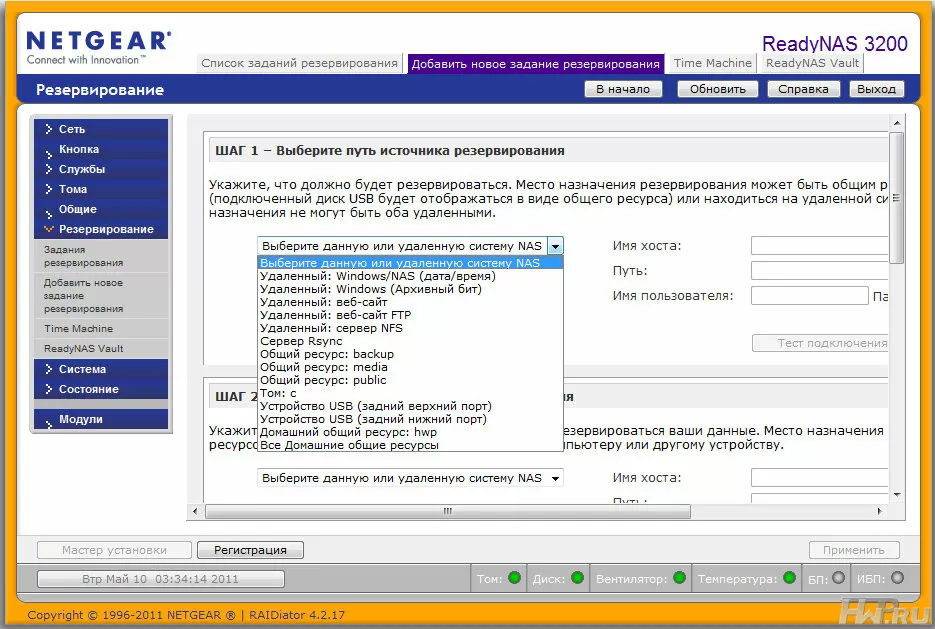
However, let's look at what there is - standard for Linux devices separation of permissions on files and folders for groups and users. Conveniently, an iSCSI partition is created within a shared volume, apparently as a file.
A very interesting feature that may be required within the framework of general virtualization is persistent reservation. The point of this function is that you can configure multiple initiators (virtual or physical machines) to connect to the same target at the same time. At the same time, only a certain one, for example, the first, will have write access. After the first one turns off, the next one will have write permission. This feature allows more flexibility in configuring shared resources for virtual machines and, accordingly, take advantage of this.
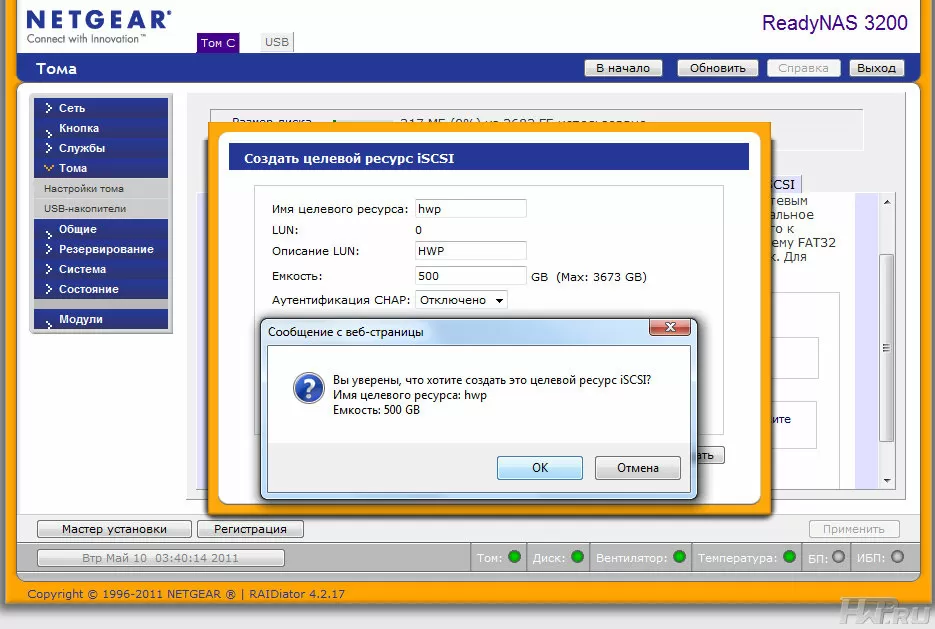
NetGear ReadyNAS 3200 can not only be used for storing backups - this NAS can back up your resources by itself, and let me explain to you how important this is. Usually, when you set up a backup, you do it on the client machine, specifying the NAS only as a network folder for storing data. If your system has a dozen of such clients, and each of them has 2-3 more tasks for backup, then you will probably find it difficult to calculate a schedule so that several tasks are not executed simultaneously, because this can lead to a significant drop in the performance of tasks and the network in overall.
When using the R-Sync protocol, the ReadyNAS 3200 server can independently connect to the remote machine and download the necessary files from it. The so-called "R-Sync pump" makes life easier when performing a large list of backups, including in networks with dynamic IP addresses, because remotely managing backups from one server is much easier and safer. Naturally, it supports recording via encrypted R-Sync over SSH and sFTP.
The NetGear ReadyNAS 3200 server allows not only to create remote synchronization tasks via Rsync, but also to add them to an unscheduled execution queue, where they will be launched sequentially as the previous one completes. In addition, it is possible to create snapshots - an image of the current state of the volume, from which you can back up, regardless of whether users have opened any files or not. This is an essential feature for a corporate multi-user environment.
For Apple users, there is TimeMachine support, which NetGear, by the way, appeared long before the rest. Also available for Mac users is the "Optimize for OS X" option, which improves performance under MacOS when accessing via SMB/CIFS.
In the list of options that affect performance, write caching to hard drives and USB drives and disable data journaling are available.
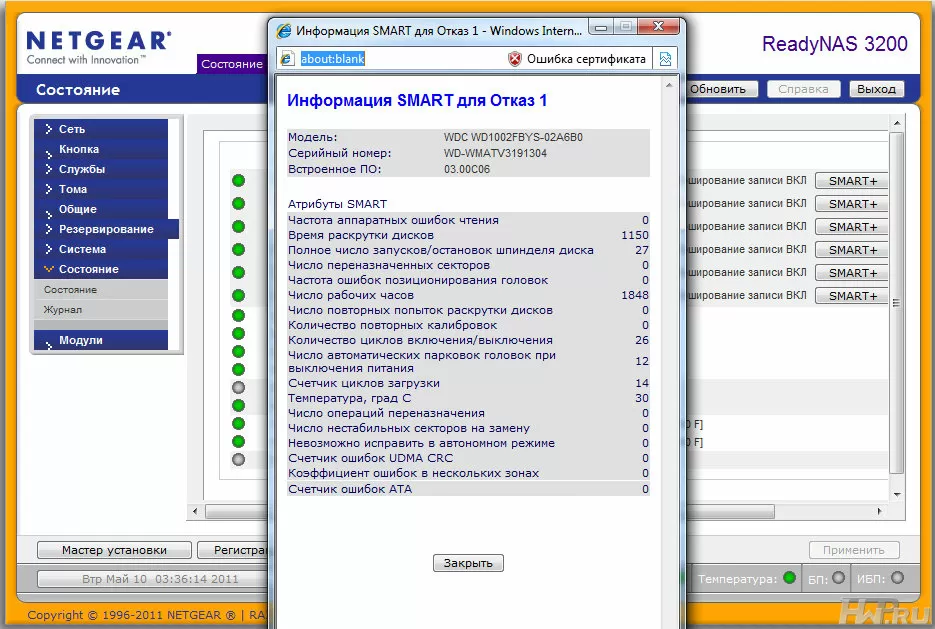
The ReadyNAS 3200 server displays complete information about the SMART status of hard drives, as well as the state of power supplies, temperatures and system fans. In the event of an emergency or, say, an increase in the number of reassigned sectors on one of the hard disks, the ReadyNAS can send messages to the mail.
Like most reputable NAS manufacturers, NetGear supports the installation of additional modules on their ReadyNASs. Useful additions include tools for replicating and integrating NAS into your corporate cloud.
Testing
For testing, we used 6 Western Digital RE3 hard drives with a capacity of 1 TB, installed in an X-RAID2 array. We will check the speed when connected via one gigabit channel, using iSCSI and SAMBA protocols. And as usual, let's start with synthetic tests.
Test system configuration:
-
Intel Xeon X3220
-
1 Gb RAM
-
WD Velociraptor 150 Gb
-
Windows XP SP3
The memory size and operating system of our test configuration are selected in accordance with the Intel NASPT benchmark. But as practice shows, when testing NAS-s, the capacity of the client system does not really matter.
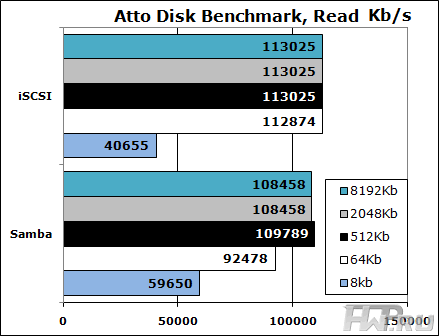
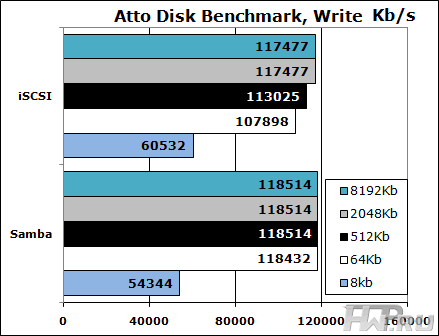
The first test is Atto Disk Benchmark. On such a powerful hardware as the ReadyNAS 3200, on a single network port, it will naturally run into the performance of a gigabit interface. And it's especially interesting to see how write caching works over the iSCSI and Samba interfaces.
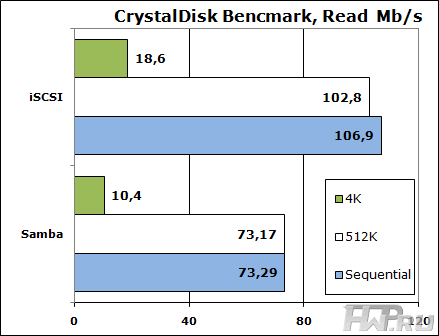
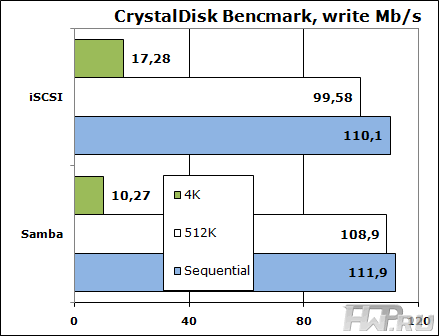
The second synthetic benchmark, CrystalDisk Benchmark, on the other hand, shows the advantages of caching write only when using the Samba protocol.
Let's move on to tests that are closer to reality. First of all, a semi-synthetic NASPT, known for being able to give a high load on any, the most modern hardware.
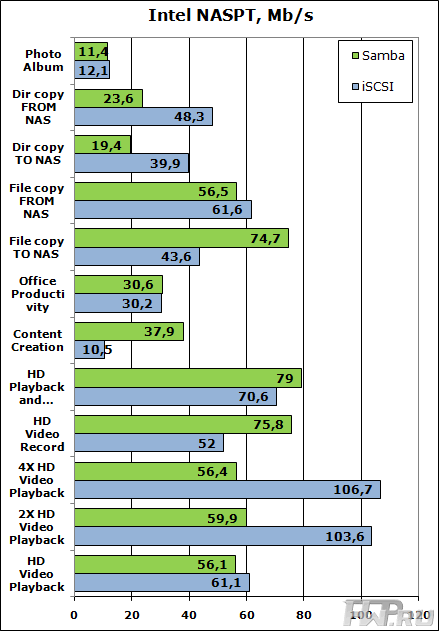
This test shows that streaming reading from NAS via Samba protocol seriously slows down with increasing number of streams, in contrast to iSCSI, which gives a big speed boost. At the same time, Samba write caching, coupled with a large amount of server memory, gives an increase in speed in tests that actively use writing, including simultaneous writing and reading.
Let's move on to our last test, the anti-virus scan of the folder stored on the NAS. The NOD32 antivirus was launched on the client machine with the default settings and selected to scan a 54.1 GB folder containing 11518 files in 593 directories. These are heterogeneous files including photos, installation archives, office documents, MP3 music, and several images of Windows and Linux virtual machines. In general, the usual heterogeneous set. This is our first experiment with a real problem on a NAS. During testing, we encountered a strange feature of NOD32 - the antivirus could shut up on an ordinary small file for several minutes. In this case, we interrupted the test and started it again. After running each test 3 times, we chose the lowest result.
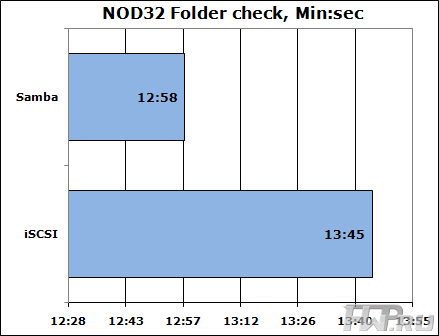
The difference was 47 seconds, and in favor of the Samba connection. A real application shows that despite all test results, the final performance depends not only on the server, but also on the task being implemented. Of course, NOD32 is not an example of how to write programs, but nevertheless, this antivirus is actively used both at home and in enterprises.
Power Consumption
To measure the energy efficiency of the server itself, we connected only one power supply unit, calculated empirically the power consumption of each disk in different modes and manipulated the number of connected disks, calculated the values in idle mode and loading the NetGear ReadyNAS 3200 storage system.
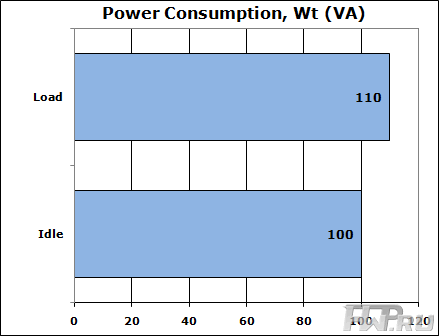
A very high-quality power supply equalized the values of the consumed (VA) and active power (Wt), and the phase shift was about 0.99, which allowed us not to differentiate the data on the diagram. But that's not the point - the difference between idle and load is only 10 watts. This suggests that the server operating system does not effectively use the energy-saving features of the electronics, and the manufacturer has a lot to strive for. The difference should be at least 20%, and more is possible on this platform. But if you look at the absolute figures, then this is a great result for rack equipment.
Conclusions
NetGear ReadyNAS 3200 is the very case when the customer is offered exactly the feature set he needs, packed into a great hardware platform. There is no such variety of service functions as the competitors, but there are more useful ones - an X-RAID2 array, an efficient backup system, support for iSCSI sequential backup, plus the highest data storage density on one unit of a server rack on 3.5-inch disks .
This is enough to make the ReadyNAS 3200 a desirable product for those who need to serve virtual environments and have limited rack space for storage in their project.
Mikhail Degtyarev (aka LIKE OFF)
24/05.2011