Synology RackStation RS212 - A New Class of Budget Rack NAS
To be honest, we found out long before the release that Synology is going to release a budget NAS for 2 hard drives for installation in a rack cabinet, and we had enough time to wonder whether it would come to release and speculate, in an era when customers are obsessed with data density, when they are actively moving to 2.5-inch drives, they scale storage systems to 96 drives, will there be a demand for a system based on an entry-level Marvell processor, with two SATA hard drives, but at the same time occupying everything the same one rack space? The release took place, and the HWP test lab became the first in the world to receive RS212 for testing. Today, with floods in Thailand pumping up the cost of hard drives, a 2-drive rackmount storage review looks like a mockery - “You still don’t have the money for four HDDs.” Be that as it may, our main goal is to answer the question "why". And we will answer it right at the beginning of the article.
Synology RS212 - for the modern office
The answer was found by chance when I was studying cooling systems of modern servers. The liquid cooler manufacturer claimed that you had enough money for mini data centers and server rooms in your company. The main problems why you cannot do this are the need for powerful cooling and high noise levels, that is, the consequences of low energy efficiency. Get rid of these problems - and install your servers not in open racks, but in closed cabinets and place them in an open space of your office. Multi-core processors, virtualization and the transition to the cloud will completely reduce your need for a server park, at least for a local one.
But even such fashionable "cloud" systems, for example, a consolidated data warehouse in the central office, can stumble upon slow and unstable communication channels. Therefore, it is more profitable to place a small storage system in a local office for the needs of the company. For example, a kind of caching storage system with frequent files - a "consultant", a file washer or working documents. Local, quickly available, they are always there and you can choose what information to keep in the office. Moreover, for small departments or companies in which file storage is not critical to the business, two disks may be sufficient for day-to-day tasks.

For a small office, it can be expensive to maintain a server room, and even a full-fledged server cabinet will most likely be empty. And given the eco-trend “we share our open-space with servers”, it is quite logical to use pendant 19-inch cabinets, in which 16-port switches and PBXs are installed. For 9-10 units, these cabinets are usually less than half full. However, they are sufficiently cooled to accommodate entry-level 1-processor servers. Considering the proximity to the PBX and the switchboard, there is no better place to be found. Well, really - is it better than buying a NAS in turret format, placing it next to the server, where it will definitely be hit and dropped?
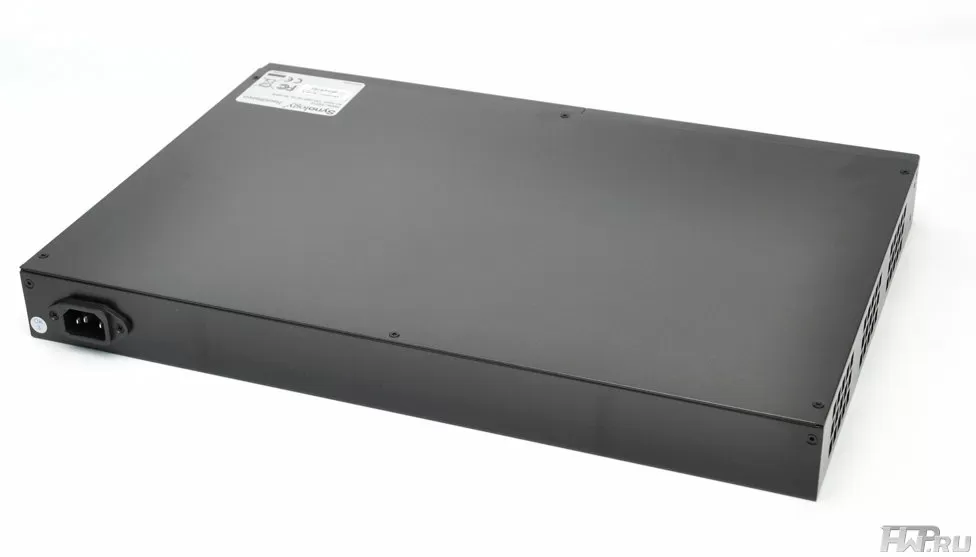
Of course, the depths of the wall cabinets are less than the standard 800mm or 600mm, and for maximum compatibility, Synology should have made the least compact enclosure, fitting its designs into a record 12 ". Moreover, while maintaining the ability to easily replace the motherboard. As a result, there is simply no room left in the case for more than two LFF drives. Why not use SFF hard drives with a 2.5-inch drive? Apparently, due to the cheaper design, and the Marvell processor will not be able to show more or less normal speed results in RAID 5 arrays.
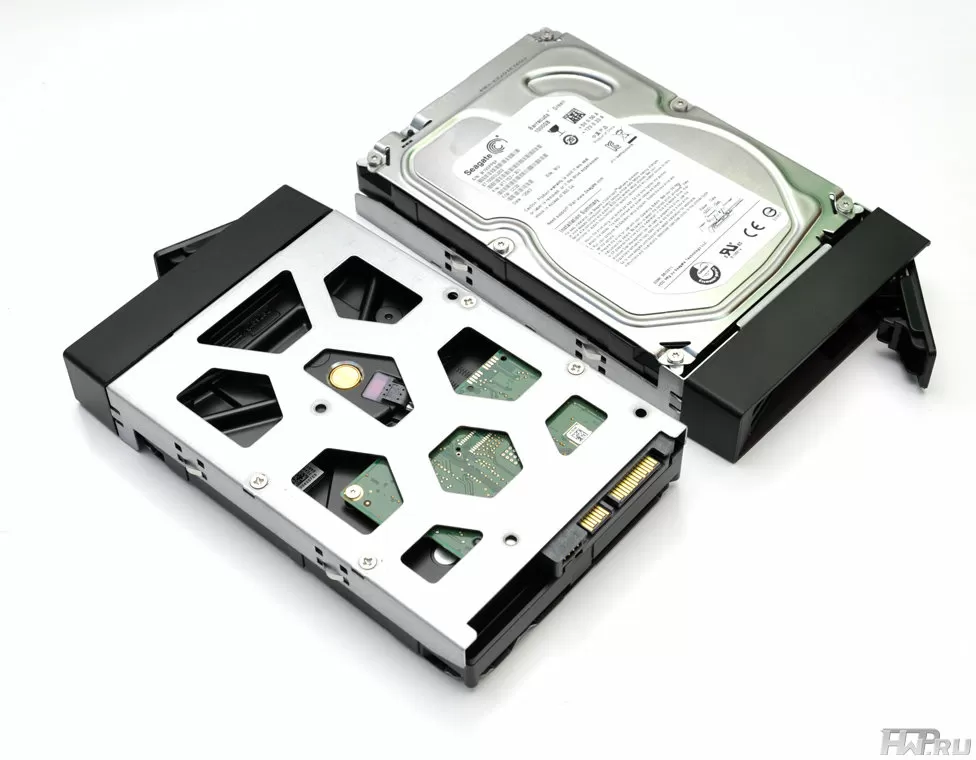
And two hard disks today are 6 TB without data protection or up to 3 TB in mirroring mode. For normal file storage with movies, photos, storing logs from several IP cameras and even incremental backups, this is more than enough for a dozen workplaces. Of course, with the competent consolidation of resources in the central office or the transition to "clouds".

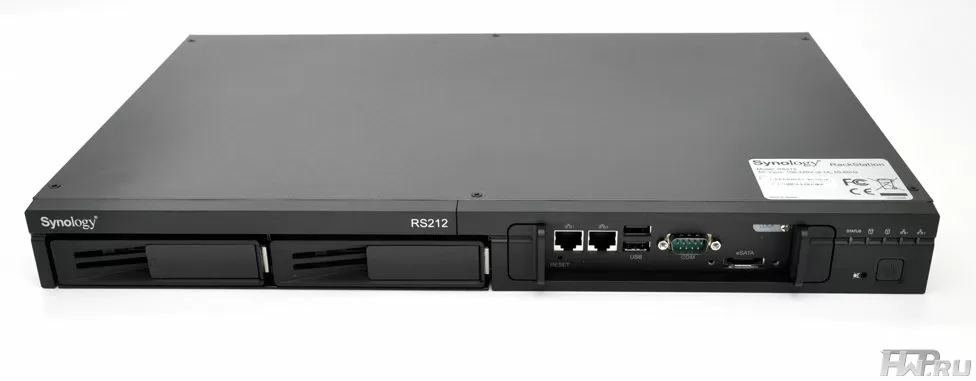
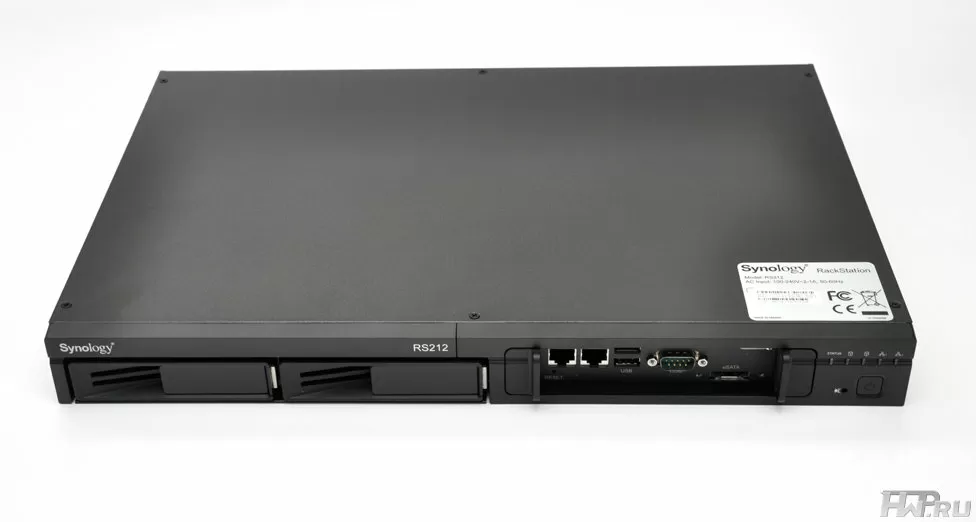
However, Synology did not emphasize the budget of its solution with any limited functions - RackStation RS212 has two network ports, two USB 2.0, one RS232 for UPS and an eSATA port for external storage and scalability. As it should be in devices for hanging cabinets, where you cannot crawl to the back of the device, all connections, except for power, are made from the front side.
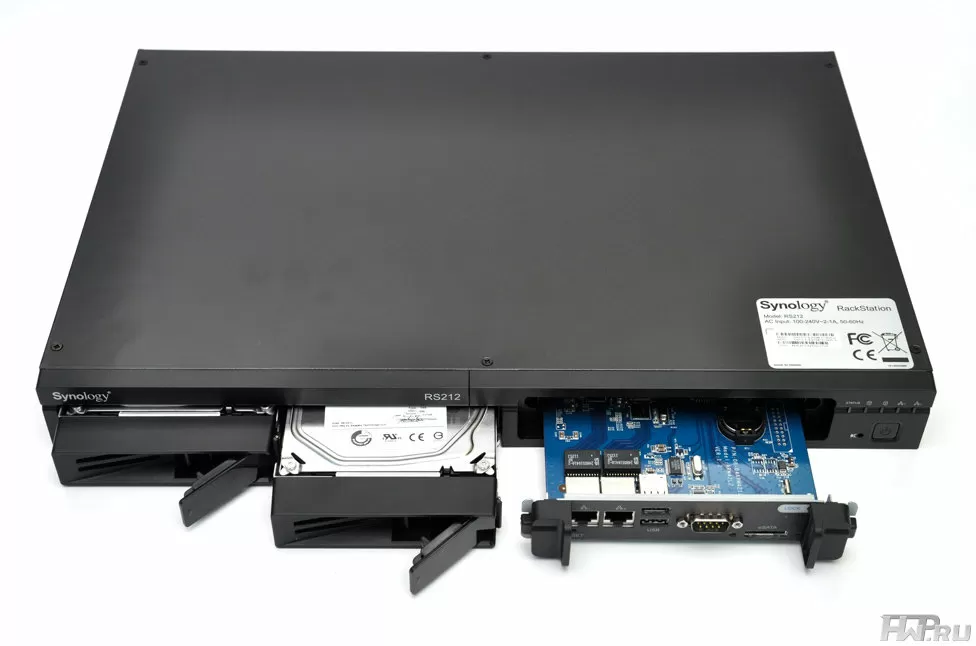
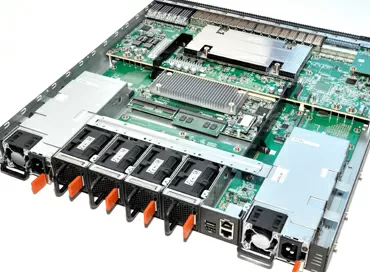
On the right side of the case there are indication LEDs - Power, Status, LAN1, LAN2, HDD1 and HDD2. But, of course, the highlight of the RackStation RS212 lies in the cold-swap motherboard. This unique feature of Synology Rack Storage allows you to replace an entire NAS board in the event of a breakdown in minutes, without disassembling the case. And since the operating system and all settings are stored on hard drives, the array and data will remain intact. A universal motherboard will reduce the number of spare parts for NAS-s in a company that uses a dozen of Synology racks at once. But, unfortunately, until now Synology has not been able to implement one card format for the entire range of NAS-s. But there is a hope that the manufacturer will release motherboards for sale separately, then the user, contrary to the laws of the server market, will be able to purchase a motherboard with a fast processor, install it into an existing server, with Down-Time less than five minutes, and get new performance. Personally, I don’t believe in such "communism", although I didn’t believe in the release of RackStation RS212 either.

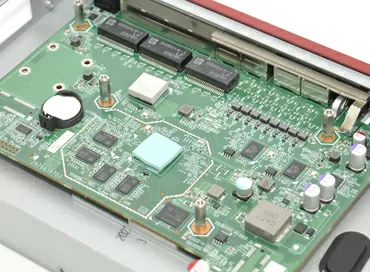
As of today, Synology RackStation RS212 has a 1.6 GHz Marvell processor and 256 MB of DDR3 memory represented by a single RAM chip on the motherboard - no upgrade options. Two Marvell 88E111GR controllers are responsible for the operation of network interfaces - very old chips. Well, the traditional 4-channel SATA host controller for Synology, Marvell 88SX7042. In general, in terms of hardware, RackStation RS212 is more like a home budget Synology DS212. Well, the absence of even a radiator on the processor (instead of it there is a heat spreader) means that there is nothing to warm up here and you don't have to worry about the safety of the system in a hanging cabinet.

Taking off the top cover from the case, we draw attention to how neat and how competent the Synology RackStation RS212 looks inside. The open-frame power supply is covered with a plastic casing and has no markings. What power it has is not known, but given that the manufacturer claims a peak system power consumption of 23.5 W (and this is with hard drives), you understand why the PSU does not even have a fan.

The case is blown from left to right by three fans with automatic speed control. Air flows past the hard drives, power supply, and the RackStation RS212 motherboard. A few cables are neatly arranged in the case and do not affect the cooling efficiency.
Obviously, the Synology RackStation RS212 has its own motherboard designed specifically for this NAS: no unused ports or connectors for you.
In general, according to the design, we can say the following: a very interesting idea, European laconicism and Japanese quality: everything looks very good, to the envy of other manufacturers of budget rackmount NAS-s. The cooling circuit has the necessary redundancy, and the idea of replacing the motherboard will probably reveal itself in the future if upgrade cards are sold. And if a company has more than one two-disk NAS installed, it’s hard to even imagine that.
Testing
Synology RackStation RS212 uses one of the most advanced NAS operating systems we've talked about many times in our reviews. This OS has excellent iSCSI support, competent separation of the access level by user, web server, print server and much more. As plugins, you can set your Synology NAS as a server for your IP PBX and collect statistics on calls from your employees.
And, of course, this NAS can work as a server for IP surveillance cameras, which is so popular that we even dedicated a separate article to this function.
So let's not once again try to grasp the immensity and talk about all the functions of Synology software - let's go directly to the tests. We installed two Seagate Constellation ES.2 (ST33000650NS) hard drives in Synology RackStation RS212 and combined them into RAID 1 with EXT4 file system and default settings.
For testing, we used a client computer with the following configuration:
- Intel Xeon 3220
- 4 Gb RAM
- Asus P5B Deluxe
- Hitachi HDS721010CLA332 1Tb HDD 7200 rpm
- Windows 7 Ultimate x64
The computer was connected to the NAS using the switch
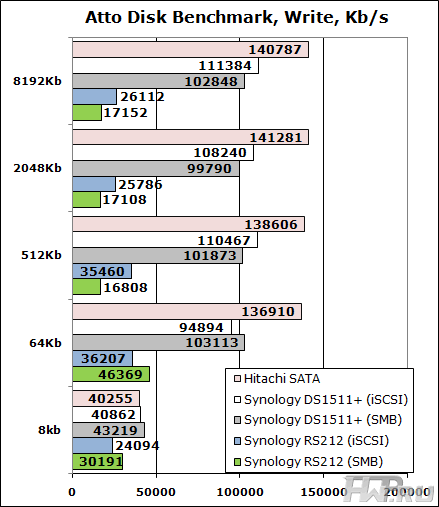
What does such an unusual NAS compare to? There are no 2-bay Rack NAS on the market today and any comparison would be unfounded. Therefore, we decided to add a typical desktop NAS for small business, the Synology DS1511 + model, with four similar drives combined in a RAID 5 array to the test chart. Yes, we know that such a comparison does not look fair, but since we are talking about NAS for business, then if you please.
Let's start with synthetic tests:

Let's move on to a more in-depth synthetic test
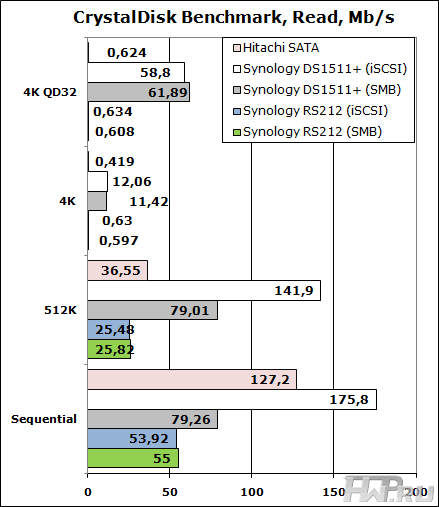
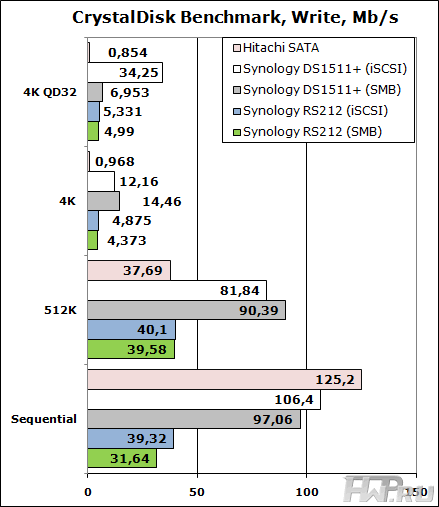
A more in-depth test of CrystalDisk Benchmark shows that although caching is used when writing, and the NAS copes well with a deep command queue, basically the performance is comparable to one desktop hard drive, everywhere, except for sequential reads, and in this the test clearly lacks the speed of the RS212 processor.
What does this performance mean in practice? Let's take a look at real applications.
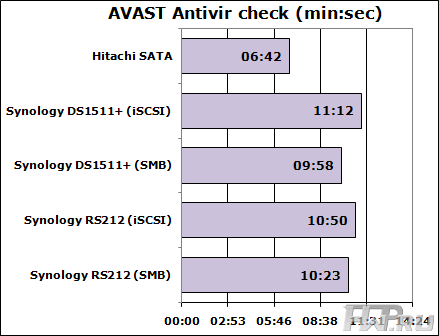
Well, by the way, in applications that use reading, this performance is not very noticeable. So this NAS is quite suitable for reading data from a file bin, if this data is subsequently processed by office computers. How are you doing with the backup?
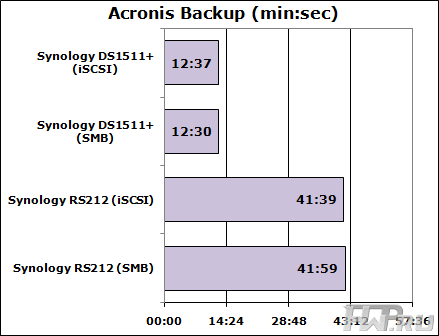
But when it comes to writing, performance is very poor, and our test shows that it is better to use some other device for backup.
Energy efficiency
Let's measure the power consumption of a server without HDD at all.
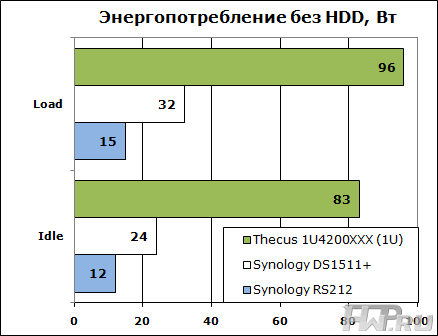
In terms of power consumption, the Synology RackStation RS212 is a clear 1U record holder. A more economical NAS is hard to imagine. The reason for this is the low power consumption of the processor and the automatic regulation of the system fans. As a result, even when tested with high loads, the RackStation RS212 ran silently - even if you install this NAS in a library, it is unlikely to interfere with anyone.
Conclusions
Synology has opened up a new market and a new class of devices not only for itself but for all of its competitors. Only time will tell how ready the customer is to purchase and install compact energy efficient solutions. But now this product looks very tempting. Perhaps this is one of the most profitable methods of organizing corporate "file sharing" and storing important files such as recordings from security cameras.
But you need to use this device wisely, it will be an undeniable competitive advantage in environments where NAS is not actively used, as an auxiliary device or for storing static information, or archives of video surveillance systems. If you want to use the device as a print server or to connect any USB devices, measure seven times and make sure that the location of the ports only on the front side will not prevent you from closing the server cabinet door.
But even with a minimal budget for infrastructure, you now have to buy a NAS and not put it next to the server, but culturally place it next to the switching equipment in a wall cabinet. For many system administrators and integrators, this is a real find, a solution that makes it possible to reduce the price of a project and make it more competitive.
Mikhail Degtyarev (aka LIKE OFF)
11/22/2011